Top 8 Butterkit Alternatives Ranked: Features, Pricing & Use Cases
Explore the top 8 Butterkit alternatives ranked by features and pricing. Find the best tools for app screenshots, ASO, automation, and scaling workflows.
Butterkit alternative tools are gaining popularity, as the Butterkit app, a macOS-only app screenshot generator, has clear limits. Butterkit is a macOS-only app screenshot generator that captures screens from the Xcode Simulator and turns them into App Store-ready visuals.
Butterkit offers no Android support, has a buggy screen capture, provides limited screenshot templates, and watermarked exports on the free plan.
The 8 best alternatives to Butterkit are AppLaunchpad, Screenshots.pro, Figma Community templates, AppMockup.com, Previewed.app, Progressier, Screenshot Studio, and Picasso.
AppLaunchpad stands out as the best Butterkit alternative. It offers 1000+ templates, 3D device frames, supports both App Store and Play Store screenshots, and works directly in your browser, making the whole process much easier.
Key Takeaways
Butterkit works well for simple iOS workflows, but its macOS-only setup and lack of Android support can limit app teams working across platforms.
The best Butterkit alternatives offer more than screenshot capture, including larger template libraries, device mockups, localization, and bulk editing.
AppLaunchpad stands out for teams that need to create screenshots for both the App Store and Google Play, with 1,000+ templates and screenshot cloning.
Automation matters when you manage multiple apps, devices, or frequent store updates, helping reduce repetitive screenshot work.
Your ideal Butterkit alternative depends on your workflow. Choose based on platform support, customization, localization, automation, and pricing rather than templates alone.
Butterkit App Explained: Capabilities and Key Limitations
ButterKit app is a macOS-based app screenshot generator designed to streamline the creation, localization, and publication of App Store screenshots. It integrates directly with the Xcode Simulator to place app screens into 3D device frames.
Pricing:
Free plan available (with watermarks).
Paid pricing involves a $20/year subscription and a $49 one-time fee.
Core Strengths of the Butterkit App
While the ButterKit app may not suit everyone, it does offer distinct advantages for macOS users:
Native macOS Integration: It connects directly with the Xcode Simulator, making it highly convenient for App developers.
Fast Screenshot Capture: Users can quickly capture app screens directly from their live app, without manually exporting files.
Built-in 3D Device Frames: It provides premium screenshot templates specifically designed for Apple devices, including iPhones, iPads, and Macs.
Simple iOS Workflow: Developers can capture, edit, and export screenshots within a single workflow.
Even with these strengths, the tool has limitations that push users to seek better alternatives, which we break down below.
Core Limitations of the Butterkit App
While native macOS integration sounds great, practical usage reveals several strict limitations:
Strictly macOS Only: The Butterkit app requires macOS 15.6 or later, so developers on Windows, Linux, or Chrome OS can’t use it. This is one of the key reasons why people are looking for a better alternative to Butterkit.
Xcode Simulator Bugs: Users frequently report capturing the wrong screen (e.g., the home screen instead of the app), distorted sizing, and failures to detect localizations.
Export and Upload Errors: The tool sometimes exports screenshots in incorrect sizes, which can cause upload failures or incomplete uploads on App Store Connect.
Lack of Flexibility: There is no support for Google Play Store screenshots, plus Butterkit lacks advanced z-index control for overlapping design elements.
Given these limitations, let’s look at the alternative to Butterkit that people are actually using to get the job done.
Where Butterkit fits today
Today, the Butterkit app is mostly suited for developers who only need to create one-off screenshots or handle small, infrequent updates. Because it lacks the necessary infrastructure to scale across multiple apps or localize screenshots for various global markets, it is not built for consistent ASO workflows or frequent app releases.
As a result, users are switching towards a better alternative to Butterkit that handles automation, localization, and integrations more reliably.
Top 8 Butterkit Alternatives
When evaluating the alternative to Butterkit, I wanted to move past marketing claims and focus on practical workflow efficiency. I focused heavily on feature depth, evaluating everything from template variety to automation, localization capabilities, and export reliability.
To ensure a fair comparison, I looked at several key evaluation criteria in each alternative to Butterkit:
Pricing versus the long-term ROI for both solo developers and larger teams.
The overall ease of use and the initial learning curve.
Scalability for handling multiple apps, localizations, or frequent updates.
My testing approach was completely hands-on. I created real screenshots for both iOS and Android apps to see how the platforms actually performed under pressure.
Tested whether the alternatives can efficiently auto-resize screenshots for both the App Store and Google Play Store.
Evaluated screenshot localization to see if the process was mostly manual or automated.
Checked screenshot templates variety and brand assets feature.
Measured the actual time taken to generate 10+ screenshots from scratch.
Quick Comparison: Top 8 Butterkit Alternatives at a Glance
Feature Comparison
Butterkit Alternative
Best For
Standout Feature
AppLaunchpad
Strongest all-in-one Butterkit alternative. Best for screenshot cloning, and offers a huge template library(1000+)
Large template library (1000+), AI automated screenshot cloning of existing projects, and easy-to-use editor
Screenshots.pro
Best alternative to Butterkit for automation and CI/CD integration
API key for CI/CD pipeline automation
Figma Community Templates
Best for high-level customization, best option for native Figma users.
Component-based editing & smart cloning
AppMockup.com
Best alternative to Butterkit for 3D device frames, and instant localization in 38 languages
Instant localization in 38 languages plus rich text editing with emojis
Previewed.app
Best for combining screenshots + promo videos
App promo video, cinematic 3D video creation
Progressier
Best alternative to Butterkit for PWA-focused teams
high-speed batch generation of static 2D screenshots
Screenshot Studio
Best for direct Apple workflows
Bulk export & direct App Store Connect upload
Picasso
Best for simple Apple workflows
Support for 40+ iOS and Android devices
Pricing Comparison
Butterkit Alternative
Starting Price
Free Plan / Trial
AppLaunchpad
$29/month
Free trial available
AppMockup.com
Templates from $7.97
Free base tool
Previewed.app
$9.99 one-time fee
Free plan available
Progressier
$25/month
14-day free trial
Screenshot Studio
Pro weekly starts at $3.99, and Pro monthly starts at $5.99
Weekly and monthly pro plan(in-app purchases)
Screenshots.pro
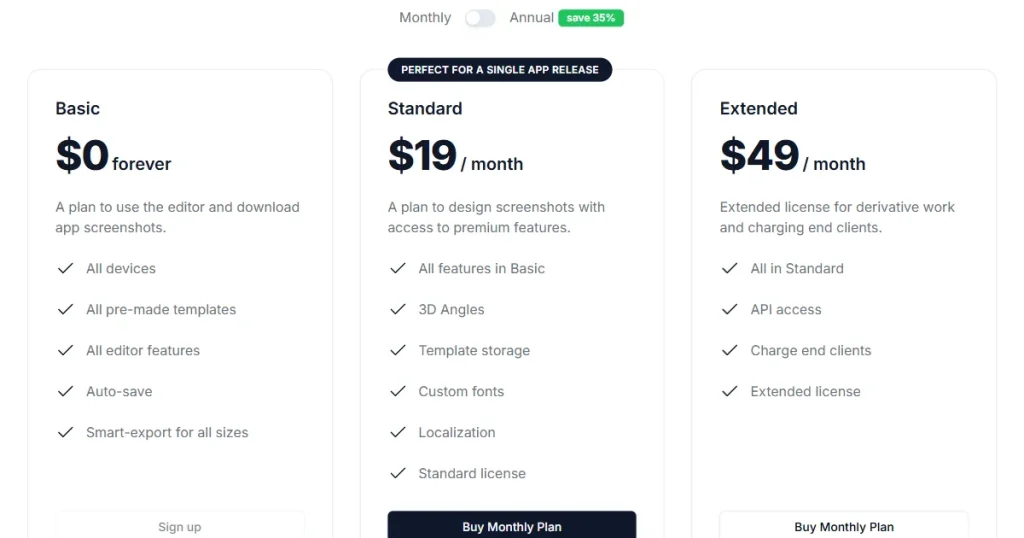
$19/month
Free plan available
Picasso
Free
Completely free
Figma Templates
Free templates
Free Figma plans available
8 Best Butterkit Alternatives
AppLaunchpad
About AppLaunchpad
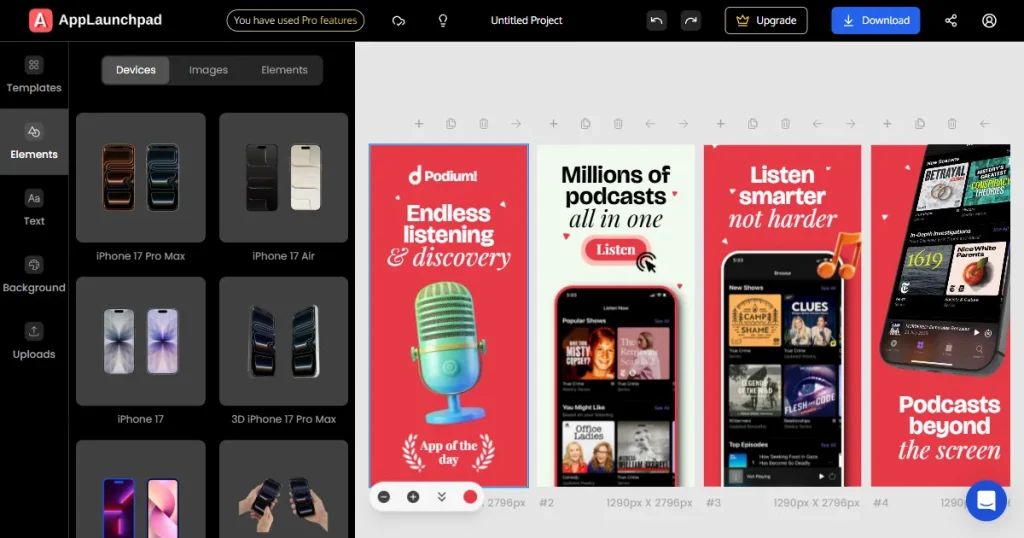
AppLaunchpad is an App Store and Google Play Store-compliant, web-based app screenshot generator that helps you create professional screenshots for your app’s listing on app stores, built specifically for growing apps.
What it does
It offers over 1,000 screenshot templates for iPhone, iPad, and Android devices.
The platform includes a library of 10,000+ design assets, such as fonts, icons, and graphics.
You can localize your screenshots into multiple languages(80+ languages) with a single click.
It lets you generate engaging device mockups and 3D device mockups in 20+ angles.
It automatically resizes your screenshots to all required dimensions for both app stores.
It supports the latest device mockups, including the iPhone 16 Pro Max and iPhone 17.
Users can fully customize backgrounds, background colors (solid and gradient), create custom layouts, and apply brand logos.
You can clone your screenshots across multiple devices to save time. You can easily do this by navigating to one of your old projects, selecting a device you want to clone to, and clicking on Clone.
You can quickly create screenshots using its beginner-friendly drag-and-drop editor.
It also includes a free app icon generator tool to complement your store listing.
Strong automation for screenshot cloning and one-click AI localization capabilities
Supports both portrait and landscape layouts
What to consider
Does not support animated promo videos
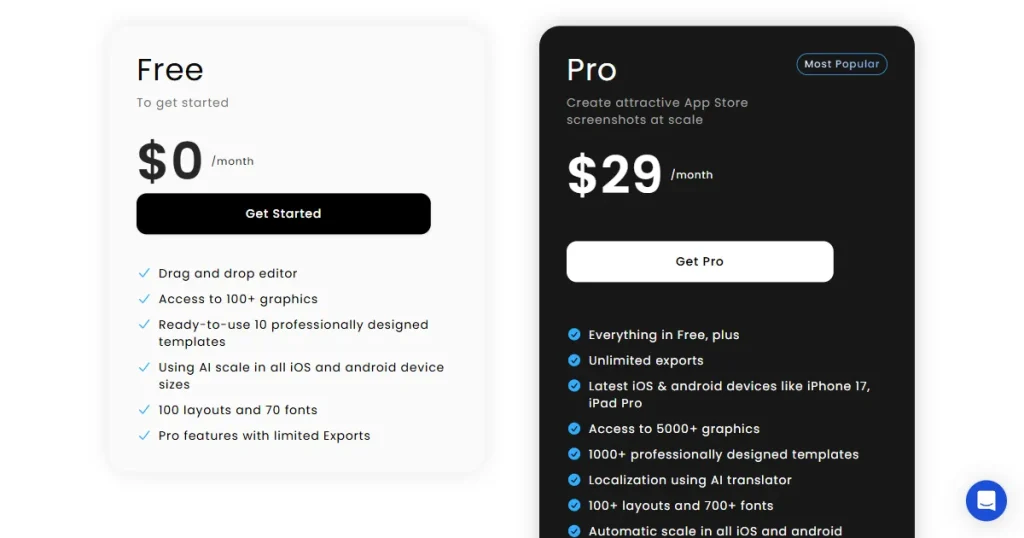
Pricing
Free trial available
Paid plan starts at $29/month
How it compares to Butterkit?
AppLaunchpad is more scalable and automation-driven than Butterkit, with an easy-to-use interface, App Store-compliant screenshots, project cloning, and AI-powered screenshot localization for iOS and Android.
AppMockup
About AppMockup
AppMockup is a free, browser-based alternative to Butterkit designed for instant screenshot creation without the need for sign-ups. AppMockup features bundled screenshot templates with varying prices; the template bundles cover major app categories such as finance, e-commerce, etc.
What it does
It provides multiple ready-to-use templates(77) for both the App Store and Google Play.
Provide 3D devices, rich text editing with emojis, and instant localization in 38 languages.
Screenshot template packs are available for app categories such as finance, e-commerce
The tool allows you to customize your backgrounds and make precise layout adjustments.
It lets you add brand logos, icons, and visual highlights to make your screenshots stand out.
It provides a live preview so you can see exactly how your listing will look before publishing.
What stands out
Free to use with no sign-up required
Figma-like interface, which is not beginner-friendly
Web-based with no setup required
What to consider
Steeper learning curve and not beginner-friendly
No automation or bulk workflows
Limited 3D devices
Category-based template packs, no monthly or yearly subscription.
Pricing
Free to use
Premium templates priced between $7.97–$14.97
How it compares to Butterkit?
AppMockup is just as simple as Butterkit, but it works in any browser, so you’re not limited to macOS. It also adds Android support, instant localization in 38 languages, real-time store previews, and a wider range of ready-made templates.
Previewed.app
About Previewed.app
Previewed.app is a web-based app screenshot generator designed to create professional, high-quality App Store and Google Play Store screenshots in minutes.
What it does
It functions as a full-featured App Store app screenshot generator supporting 10 panoramic screenshots.
It allows you to customize text, colors, background images, unique design elements, and 3D device frames.
The platform also includes a device mockup generator and lets you create engaging app promo videos.
Supports a wide range of device frames, including iPhones (4″ and 6.5″), iPads (2nd and 3rd Gen), Android phones, tablets, and laptops.
It supports exporting screenshots in PNG, JPEG, and MP4 formats.
All of your projects are securely backed up in the cloud.
It includes team collaboration features, such as mockup groups, which let you invite your team members to work together.
What stands out
You can generate app screenshots as well as app promo videos.
Supports multiple devices, including iPhones, iPads, Android phones, tablets, laptops, and monitors.
All your templates are saved in the cloud, so you can access them anytime.
What to consider
Templates are generic and plain.
Limited customization for 3D devices, custom fonts, design elements, and design illustrations.
Pricing
Free plan available
Paid plan starts at $9.99 (one-time fee)
How it compares to Butterkit?
Previewed adds valuable video creation features and cross-platform browser support, offering a much stronger visual output for marketing assets compared to Butterkit’s static device frames, not to mention a larger device library.
Progressier
About Progressier
Progressier is a complete PWA platform that helps you build and manage your app from one dashboard. It includes a built-in screenshot designer along with other tools.
It also works as a no-code toolkit, letting you add app-like features such as home screen installation and push notifications without writing complex code.
What it does
It features a free built-in screenshot designer to create professional app store screenshots in a few minutes, plus a Splash Screen Generator.
No coding needed, you can send push notifications with the API, and your app works offline too.
You can use the apply to all feature to instantly push bulk edits across all screens.
It provides built-in localization support for targeting different global markets.
You can choose from custom device frames in unique styles, such as ivory, charcoal, and rust.
The tool supports the latest devices, including the iPhone 17 Pro Max and Google Pixel 10.
You can set custom screenshot dimensions to suit your specific needs.
It allows you to export screenshots in both JPG and PNG formats.
Beyond screenshots, it supports full Progressive Web App features, including push notifications.
What stands out
An all-in-one tool that handles both screenshots and full PWA features.
No coding needed to add features like push notifications and offline access.
Offers the latest devices, including the iPhone 17 Pro Max and Google Pixel 10.
Apply to all features saves a lot of time when editing multiple screens.
What to consider
The visual assets only cover Android screenshots, not iOS device screenshots.
It doesn’t support any background customization.
Overkill if you only need screenshots
No 3D or handheld device mockups, no design library for icons or illustrations.
No free plan (only a 14-day trial)
Expensive if you just need screenshots
Pricing
Starts at $25/month
14-day free trial
How it compares to Butterkit?
Progressier offers a lot more features for building full PWA apps, so it’s less focused on app screenshots than Butterkit, but its bulk screenshot editing feature is really useful.
Screenshot Studio
About Screenshot Studio
Screenshot Studio is an iOS and macOS app screenshot generator app with an intuitive interface for designing stunning App Store screenshots.
What it does
It offers rapid, template-based screenshot creation natively on iOS and macOS devices.
You can fully customize the orientation, fonts, layout, and backgrounds of your screenshots.
It offers AI translation to help you easily localize your screenshots for global audiences.
You can perform bulk screenshot exports to speed up your workflow.
It allows you to upload your screenshots directly to App Store Connect.
Supports major devices including iPhone, Mac, Apple Watch, Vision Pro, and Android.
What stands out
Completely free-to-use tool
Direct upload to App Store Connect
Wide range of devices across iOS and Android
What to consider
Not a web-based app screenshot generator
Generic and plain screenshot templates
Lacks advanced features like 3D mockups
Pricing
Pro weekly starts at $3.99, and Pro monthly starts at $5.99
How it compares to Butterkit?
Screenshot Studio makes it much easier to create and upload app screenshots than Butterkit, with AI-powered localization, direct App Store publishing, and support for Android devices.
Screenshots.pro
About Screenshots.pro
Screenshots.pro is a developer-friendly app screenshot generator built for automation. It lets you create clean, professional screenshots and easily update them via API integrations.
What it does
It offers 10 templates for App Store and Play Store screenshots.
Supports the latest iOS and Android devices, including iPhone 16 Pro Max and various Google Pixel and Samsung models.
You can generate eye-catching 3D device mockups and animated videos.
It provides an API key you can integrate into your CI/CD pipeline to automate screenshot updates.
It includes localization support to help you adapt your app screenshot content for global markets.
The platform features autosave and server sync, so you never lose your progress.
The tool automatically resizes your screenshots to meet store guidelines.
What stands out
Strong automation capabilities, such as automated screenshot resizing.
Developer-friendly with API access.
Ideal for developer-oriented workflows.
What to consider
Limited templates(only 10 templates) and customization options
No access to icons, labels, or design illustrations
Pricing
Free plan available
Standard plan starts at $19/month
How it compares to Butterkit?
Screenshots.pro is much better for scaling and screenshot automation, thanks to its API. It easily beats Butterkit’s manual simulator-based workflow, especially for handling larger projects.
Picasso
About Picasso
Picasso App Screenshot Studio is a free, native tool for creating professional App Store screenshots for iOS, iPadOS, and macOS apps.
What it does
It functions as a native macOS drag-and-drop screenshot editor.
It supports over 40 different device frames across Apple devices.
It handles localization manually by allowing you to upload .xcstrings files.
The platform supports devices such as iPhone, iPad, Mac, Vision Pro, and iMessage.
You can upload your finalized files directly to App Store Connect.
The tool automatically adds appropriate device frames to your raw screen captures.
What stands out
100% free, quick setup, easy-to-use tool.
Works smoothly with Xcode, and you can upload screenshots directly to App Store Connect.
Supports a wide variety of iOS devices, including iPhone, iPad, Mac, Vision Pro, and iMessage.
What to consider
Not web-based
No automated localization (requires file upload)
No batch screenshot generation or export
Plagued by bugs (incorrect sizing, failing uploads)
Very high CPU usage
Pricing
Free-to-use tool
How it compares to Butterkit?
Picasso offers more device frames and a similar native macOS feel, but unfortunately, it suffers from the same, or even worse, bugs and reliability issues as Butterkit.
Figma Community Templates
About Figma community templates
Figma Community screenshot templates are free, user-created templates shared on Figma Community. The Figma community is a public space where designers can publish templates and other design work, allowing maximum design customization.
What it does
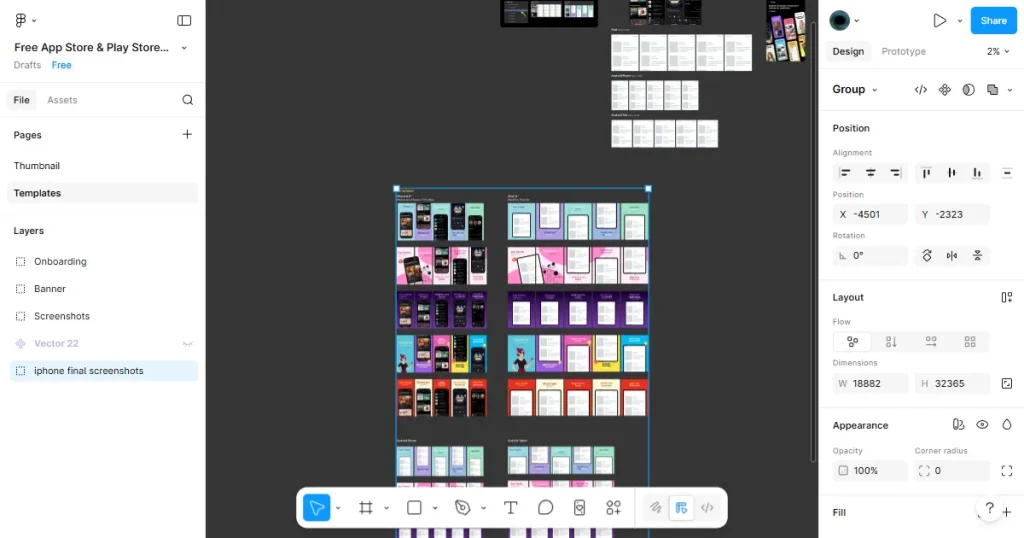
They offer 500+ fully customizable screenshot designs you can tweak endlessly.
The templates include multi-device frames covering exact dimensions for iOS and Android.
Figma community templates are compatible with both App Store and Google Play Store.
You can use component-based editing to ensure visual consistency across all frames.
You can use Figma variables to make bulk exports and smart cloning much easier.
Localization can be achieved by integrating third-party Figma plugins.
You can manage your global design themes effortlessly from a single source file.
What stands out
Maximum design flexibility
Free templates available
Strong collaboration features
What to consider
Requires design skills
Limited automation for localization (often requires manual frame duplication)
Using Figma on mobile is not efficient
The free plan has limits on team features, projects, and collaboration options.
Pricing
Free templates
Paid Figma plans for advanced team features
How it compares to Butterkit?
Figma offers greater design flexibility than Butterkit, but it requires actual design skills and lacks the direct ASO automation that native app screenshot generators offer.
Final Thoughts
At the end of the day, moving away from Butterkit is about making your app release process smoother. The biggest choice you need to make when picking a new tool is between saving time (automation) and having total control (customization).
But beyond choosing the right workflow, there’s one factor that directly impacts your growth, localizing your app screenshots into different languages is one of the easiest and fastest ways to get more global downloads.
While free tools are great for your very first app launch, investing in a reliable, bug-free premium tool will speed up your future updates and directly boost your App Store success.
FAQs
What are the biggest limitations of the Butterkit App?
The biggest limitations of the Butterkit app include being macOS-only, frequent bugs in the Xcode Simulator (capturing incorrect screen sizes), export bugs that cause App Store Connect upload errors, and a complete lack of Android support.
Which Butterkit Alternative is best for localized screenshots?
AppLaunchpad and Screenshots.pro are the best for localization, offering AI-powered translations and automated workflows for global markets.
Which Butterkit Alternative is App Store and Google Play Store compliant?
AppLaunchpad, Screenshots.pro, and Screenshot Studio automatically handle the complex resizing requirements to ensure compliance with both the App Store and Google Play Store.
AppLaunchpad vs Butterkit: Which tool is best for App Store screenshots?
AppLaunchpad is better for scaling, automation, and ASO optimization. Unlike Butterkit, it supports Android, runs in the browser, and features powerful AI localization without the export bugs.
What is the best alternative to Butterkit?
The best alternative to Butterkit depends on your needs, but tools like AppLaunchpad are often preferred. It works on any device, supports both iOS and Android screenshots, and offers ready-made templates that make creating app screenshots much faster and easier.
Boost app growth with the 20 best AI marketing tools of 2026. Master ASO, automate retention, and scale faster with expert picks for indie devs and growth teams