AppMockup Studio is a simple browser-based app store screenshot generator for creating App Store screenshots using ready-made templates.
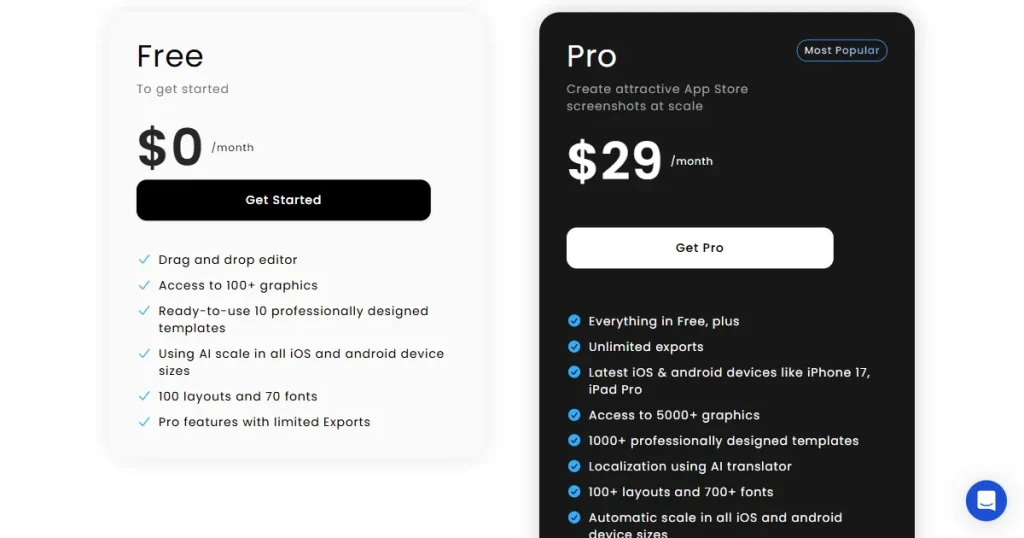
However, it comes with clear limitations, such as only 70 screenshot templates, no brand kit support, no localization features, and no access to the latest iOS or Android devices.
AppLaunchpad stands out as the best AppMockup alternative, offering 1000+ modern templates, support for the latest devices like iPhone 17 Pro Max, AI localization for 80+ languages, and full brand kit support for logos, fonts, and custom assets.
Alongside AppLaunchpad, we have also covered other tools like Previewed, AppScreens, MockUPhone, and many more.
Key Highlights
App store screenshots can make or break your app, so make sure you go through each tool to check its readiness before making a decision.
AppMockup Studio is a web-based app store screenshot generator, but it has a few limitations, such as limited templates and limited device coverage, which make people look for better alternatives to AppMockup.
The Top 7 AppMockup alternatives include free tools like MockUPhone as well as full-featured platforms like AppLaunchpad, catering to every budget and workflow.
Pick an app store screenshot generator that covers app store compliance, has a wide template library, supports the latest devices, and keeps up-to-date with the latest design trends. Missing any of these will slow down your workflow.
Always cross-check dimensions against Apple Store and Play Store guidelines and review every screenshot before you submit, regardless of which tool you use.
MockUPhone is the only completely free tool with no watermarks or subscriptions, while AppLaunchpad offers free plans with a few limitations, like a lack of team collaboration features.
AppLaunchpad stands out as the best alternative to AppMockup for its 1000+ pre-built templates, 10,000+ graphics library, 80+ language localization, brand kit support, Unsplash integration, screenshot inspiration gallery, and more.
Why Are Developers Looking for AppMockup Alternatives?
While AppMockup Studio remains a solid app store screenshot generator, many users seek better alternatives to AppMockup due to a few key limitations.
No support for the latest iOS or Android devices: The available app screenshot device frames are limited to models such as iPhone 16 Pro Max, Galaxy S21 Ultra, and iPhone 14 Plus, with no support for the latest iOS devices, such as the iPhone 17 Pro Max.
Lacks localization: AppMockup Studio doesn’t support localization, so text translation must be done manually. Localization of visual assets, such as app screenshots and product mockups, is important to expand into the global market.
No brand kit support: You will have to manually enter your logo, branding, and fonts each time you generate a screenshot. This delays the workflow.
Limited template library: This is one of the major reasons why people are looking for an alternative to AppMockup. AppMockup Studio offers only 77 templates, making it difficult to find a design that suits your app.
How We Evaluated the Following AppMockup Studio Alternatives?
To help you find the best AppMockup alternative for your specific needs, we compared each alternative to AppMockup across a set of key criteria.
Photorealistic rendering: We evaluated these AppMockup alternatives based on the quality of their exports, real-looking shadows, and textures.
Device frame coverage: We checked whether the alternative to AppMockup supports the latest device frames for iPhone, iPad, Android, Apple Watch, and Vision Pro.
Store compliance: We also checked whether these tools support the size presets specified by the App Storeand the Play Store, or if we need to manually resize the device frame.
Brand kit support: We also evaluated these tools on whether they support uploading a brand asset and using it across templates.
Localization: We checked whether they support AI localization of texts in multiple languages to evaluate how easy it would be for you to market your app globally.
A Sneak Peek Into The 7 AppMockup Alternatives
AppMockup Alternative
Best For
Free Plan
Watermark Free
All App Store Sizes Covered
Localization
Starting Price
A/B Screenshot Testing
AppLaunchpad
ASO screenshot workflow
Yes
Yes
Yes
80+ lang
$29/month
Yes
Previewed
Animated Mockups
Yes
Yes
No
No
$29/month
No
Screenshots.pro
Budget 3D
Yes
Yes
No
37
$19/month
Yes
MockUPhone
Quick mockups
Yes
Yes
No
None
Free
No
Figma
Design teams
Yes
Yes
Manual
Manual
$20/month
No
AppScreens
Multi-store launch
Yes
No
Yes
80+ lang
$25/month
No
Placeit
Video/marketing
No
Yes
No
None
$14.95/month
No
7 Best AppMockup Studio Alternatives
1. AppLaunchpad – App Store Screenshot Generator With Latest iOS & Android Devices
What is AppLaunchpad?
AppLaunchpad is a web-based app store screenshot generator that helps app developers, marketers, and founders create professional screenshots for the App Store and Play Store.
You can think of it as Canva, but for app store screenshots. All you need to do is upload raw screenshots of your app, pick a template, and customize with simple drag-and-drop tools. And in just a few minutes, you will have professional, realistic-looking screenshots ready to export.
As one of the most feature-complete AppMockup alternatives available today, it covers everything from AI localization to project cloning
Benefits
AI-powered bulk localization: Which translates your screenshot text to 80+ different languages, manual resizing, and text replacement per locale.
Ever-expanding templates: Add 1000+ app screenshot templates across various app categories such as fitness, travel, finance, and more. The large template library makes it one of the best alternative to AppMockup.
Screenshot inspiration gallery: If you’re not sure where to start, AppLaunchpad has 4000+ real app examples to reference before you work on your app store screenshot design.
Huge asset library: With over 10k+ built-in graphics, icons, and illustrations, meaning you can style and customize your app store screenshots easily.
Ease of use: Comes with a drag-and-drop editor, so even beginners with no design skills can use it without going through the complex learning curve.
3D device and hand mockup support: You can place your app screenshots into realistic 3D device frames and handheld device mockups for a more engaging, lifelike presentation.
Up-to-date device support: AppLaunchpad continuously adds the newest iPhones, iPads, and Android devices, including iPhone 17, so you never fall behind on store requirements.
Background customization: Choose from solid colors, gradients, patterns, or images (including Unsplash integration and ready-made presets) to set the right mood for your screenshots.
Pricing
Free plan available.
Premium Plan: Starts at $19/month with code APPLOVE for the first month, then $29/month.
2. Previewed – Best Tool For Animated Device Mockups
What is Previewed?
Previewed is an app store screenshot generator primarily focused on simplicity and fast mockup creation. It is an excellent AppMockup alternative, as it excels at creating professional-looking device mockup videos for promotional content.
Benefits
True minimalist interface: Very clean and intuitive interface, with the quickest setup of any tool on this list.
Studio-quality mockup videos: You can create smooth, animated mockups directly from your app screens with ready-made templates and simple customization tools.
Full 3D mockup support: It turns boring screenshots into dynamic, high-end videos and 3D visuals that make your work look professional. It’s one of the best 3D mockup alternative to AppMockup.
Pricing
Plus plan: Available at a one-time fee of $9.99, with limited features.
Pro plan: Starts at $29/month.
3. Screenshots.Pro – Perfect For One-Time 3D Mockups
What is Screenshots.Pro?
Screenshots.pro is yet another alternative to AppMockup, targeting indie developers, solopreneurs, and small teams who prefer speed over customization.
Benefits
No account needed: You can actually start designing and testing layouts without needing to enter your account details, which is great for one-off experiments.
3D device support: It offers clay and real device frames with adjustable 3D perspective angles to create high-quality aesthetic screenshots.
Localization supports: This AppMockup alternative translates screenshot text into 37 languages.
Custom fonts and branding: It also lets you upload your custom fonts to maintain consistent branding across all platforms.
Pricing
Paid plan: Starts at $19/month.
4. MockUPhone – Completely Free Tool for Fast Mockups
What is MockUPhone?
MockUPhone is not a full-featured app store screenshot generator. It is a free, frictionless alternative to AppMockup that lets you upload a screenshot, select a device frame, and download the result. It’s free and doesn’t require a monthly or yearly subscription.
Benefits
Completely free: The best free alternative to AppMockup, with no watermarks or subscription.
Massive device library: It supports many devices, including older Androids, but for Apple devices, it only goes up to the iPhone 15 and doesn’t include the latest models like the iPhone 17 Pro Max.
Responsive design showcase: This AppMockup alternative makes it easier to compare how your app’s design looks across different devices and gather feedback instantly.
Pricing
Free
5. Figma – Best for Design Teams Looking for Complete Creative Freedom
What is Figma?
Figma is a popular cloud-based design tool used by teams to work together. However, using it as an app store screenshot generator to create app screenshots requires more manual setup than dedicated tools, but it gives you more creative control over your exports.
It is not built specifically for app screenshots, but it is widely used by designers who want complete control over their assets, thanks to plugins like Storeshorts or Screeny, which are available on their platform.
Benefits
Real-time collaboration: Allows multiple people to work on the file together, enabling them to leave comments or make changes, making the workflow smoother.
Unrestricted freedom: There are no layout restrictions, and every element is customizable. Which means you can create something completely different from what’s available in the market.
Huge plugin library: Check the Figma Community for existing device frame templates before building anything from scratch. It saves hours of setup time.
Consistent design system: Figma’s components and shared styles keep your designs consistent. When you update one master design, every screenshot updates instantly, saving you tons of time across different app versions.
Pricing
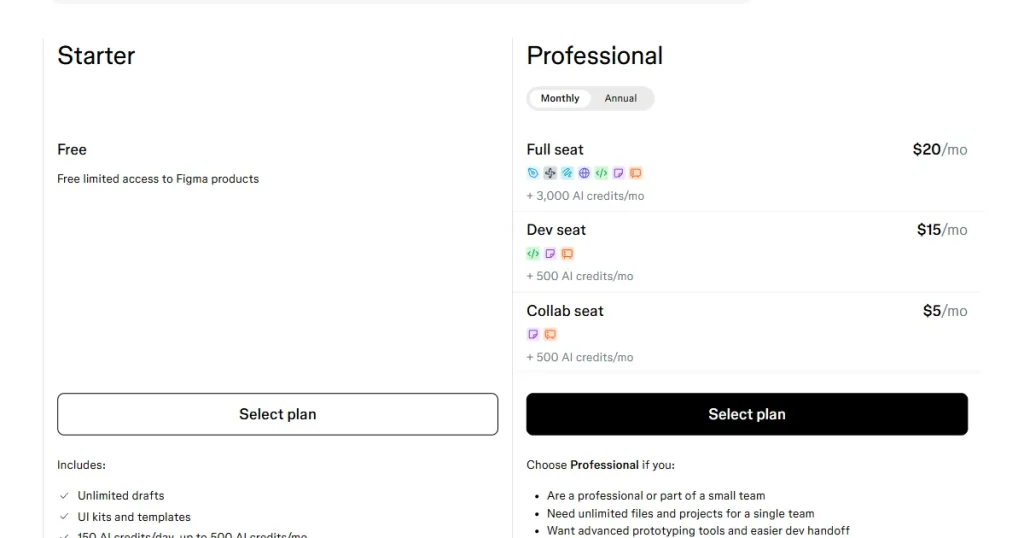
Paid plan: Starts at $20/month.
6. AppScreens – Best for Multi-Store Launch and Worldwide Appeal
What is AppScreens?
This is another great alternative to AppMockup. AppScreens is an automation-first app store screenshot generator designed for developers who want to ship their apps across multiple platforms and languages simultaneously.
This AppMockup alternative is especially strong for multi-store workflows. However, it lacks a drag-and-drop editor and can be hard to learn due to its positioning system.
Benefits
Multi-store coverage: This AppMockup alternative covers a wider range of stores, including the Chrome Web Store, Amazon Appstore, Huawei AppGallery, the App Store, and the Play Store.
Supports AI localization: It uses AI to translate your screenshot into 80 languages, which is useful for international app launches.
Variety of device frames: You can choose from realistic, clay, 3D, or frameless device styles and fully customize them by rotating, scaling, and changing colors.
Direct store publishing: This AppMockup alternative also includes direct App Store and Play Store integration, which updates your app screenshots without manual uploads.
Pricing
Paid plan: Starts from $25/month.
7. Placeit – Ultimate All-In-One Tool For All Your Mockup Needs
What is Placeit?
Placeit is an all-in-onecreative alternative to AppMockup, offering more than just app screenshots. It covers a wide range of functions like apparel mockups, logo creation, and social media graphics. This means business owners and creatives can create all their brand assets in one place without switching tools.
Benefits
Largest video library: Placeit has a robust video mockup library that is extremely useful for generating animated app promo clips for app presentations.
Pay-per-asset: Like other tools, Placeit offers a subscription-based model, but you can also use its templates on a one-time basis, which is perfect for testing before choosing the right tool for your needs.
Rich customization options: You can go beyond basic screenshot templates and add different backgrounds, AI-generated images, devices held by a person, grouped with other devices, or additional graphics to make your app stand out.
Pricing
Subscription: $14.95/month with unlimited access to video, photo, and animated templates.
Final Verdict: Which AppMockup Alternative Is Best for You?
Choose an app store screenshot generator based on what your workflow actually needs, not just what looks popular. If you are focused on ASO and need localization, correct sizes, and brand kit support in one place, AppLaunchpad is the most complete option.
If you are shipping across multiple stores or need animated mockups for marketing, AppScreens and Previewed are better fits for those specific jobs. A better approach is to start with a free plan on one or two tools and test them against your real app screens before committing.
FAQs
What is AppMockup Studio used for?
AppMockup Studio is a web-based tool for creating app store screenshots that show your app in real device frames for App Store and Google Play listings.
Are there free AppMockup alternatives?
Yes. Tools like AppLaunchpad, AppScreens, and Figma offer free plans and can be used to create app store screenshots.
Which tool is best for optimizing App Store screenshots?
AppLaunchpad is the best all-in-one option for optimizing App Store screenshots, with correct sizes, 80+ language localization, and A/B testing in one place.
Can I use Figma as an alternative to AppMockup?
Yes, Figma can work as an alternative to AppMockup, but it works best for designers already familiar with the tool.
Do these app store screenshot generators support both iOS and Android screenshot sizes?
All 7 AppMockup alternatives on this list support both platforms to varying degrees, but not all of them produce store-submission-ready files.
AppLaunchpad is one of the best AppScreens alternatives, offering a wider template selection, stronger automation, and built-in localization that AppScreens […]
In this AppLaunchpad vs AppScreens comparison, AppLaunchpad is the better app screenshot generator. It offers an intuitive interface, larger category-based […]