Mobbin is a design tool widely used by UI/UX designers and product developers to find inspiration for designing apps and websites. However, its curated library has its limits, especially if you’re searching for a broader range of design styles and workflows.
That’s why we’ve rounded up the best Mobbin alternatives, including AppLaunchpad, Refero, and CollectUI, each of which covers a different use case and draws inspiration from a large collection of apps and websites.
Key Insights
Look for features beyond static screenshots, such as user flows, advanced search filters, Figma integrations, and regularly updated design libraries.
The best Mobbin alternative depends on your workflow. Some tools are better for product research, while others focus on app store assets or interface inspiration.
AppLaunchpad stands out as a strong Mobbin alternative by offering 4,000+ app store screenshots across 25+ categories, along with a built-in screenshot editor for customization.
Platforms like Refero and Appshots provide massive UI libraries, complete user flows, and AI-powered search, making them excellent Mobbin alternatives design inspiration websites for product teams.
Pttrns is ideal for mobile UI research, while CollectUI focuses on individual UI components like onboarding screens, pricing pages, and navigation elements.
What is Mobbin?
Mobbin is a massive, curated library of UI and UX designs from real-world mobile and web apps. It is popular among designers, developers, and product managers to explore the user interfaces of top-ranking apps and websites and to be inspired to create their own products.
It’s especially useful for product designers, helping them overcome creative blocks and combine UI elements to create unique designs. Here are a few other reasons why app teams use Mobbin design tool.
Why Do App Teams Use Mobbin?
Here are a few usecases of Mobbin design.
Accessing Real App UI Design Inspiration
Mobbin design curates app and website designs on its platform, so designers don’t need to start from scratch and have a better understanding of what kind of design works for their audience before they even start designing their own app or website.
Studying User Flows Across Popular Apps
Another big reason app developers use Mobbin is that it provides user onboarding flows that give them an idea of the user journey after installing the app. This gives them a clear understanding of which user flows work and which don’t, so they can improve the user experience.
Benchmarking Product Design Trends
Since Mobbin design consistently updates its library with new app structure layouts, interactions, and user journeys, app teams who use Mobbin always stay ahead of their competitors in improving overall app quality.
The Problem With Relying on a Single Design Inspiration Platform Like Mobbin
Although Mobbin is an excellent tool for design inspiration, it still has a few limitations. Here are the reasons why developers and designers are looking for Mobbin alternatives.
Missing the Why behind the design: While Mobbin is great for exploring user flows, it doesn’t capture micro-interactions, edge cases, or the research and technical constraints behind the final design.
Leads to designs looking similar: When thousands of designers rely on the same inspiration library, products start looking similar, leading to repetitive interfaces instead of unique user experiences.
Lacks broader creative experience: Mobbin is primarily focused on mobile apps and SaaS workflows, and there’s no coverage of branding, creative landing pages, editorial layouts, or futuristic web design concepts.
Limited design context: With Mobbin, you only see what looks good. It lacks real-world metrics, A/B testing data, and user insights needed to evaluate whether a design change actually improves results.
What to Look for in a Mobbin Alternative?
Now that we know why we need Mobbin alternatives, let’s look at a few features that must be present in a Mobbin alternative.
Platform coverage: Select a platform based on whether you want mobile-focused design patterns or a combined library of both web and mobile patterns to conduct more flexible product research.
Flow screens vs static screens: The best Mobbin alternative for design inspiration should offer user journeys and app flows, rather than a series of static screens, so teams can see the flow of the full experience.
Component-level search: A good Mobbin alternative should also allow users to filter for UI patterns like onboarding flows, checkout processes, empty states, or navigation elements beyond just general categories.
Export and Integrations: Always choose a Mobbin alternative that offers direct integrations with Figma or other design tools, so your team can go from inspiration to design in just a few clicks.
Pricing and free plan restrictions: Check whether the tool offers plan restrictions to see if it fits your startup budget and provides enough to conduct design research on a regular basis before deciding which platform to go with.
The Best Mobbin Alternatives You Can Try in 2026
1. AppLaunchpad
AppLaunchpad is a dedicated app store screenshot generator tool used by app developers and marketers to create professional-looking app store screenshots for improved app conversions.
Moreover, AppLaunchpad also has a dedicated app store inspirations gallery with app screenshots from over 4000+ top-performing apps on the App Store, so app developers always have a reference for what’s working before they start creating their app store screenshots.
What it does
Massive app screenshots library: AppLaunchpad has a gallery of over 4,000 app screenshots from top-ranking apps, updated regularly.
Covers both iPhone and iPad screenshots: AppLaunchpad not only covers iPhone screenshots, but also iPad app screenshots, so you can get design inspirations for both devices in one place.
Covers multiple categories: This Mobbin alternative also covers more than 25+ categories of apps, so you can always find what you are looking for, irrespective of your industry.
No login or signup required: Using AppLaunchpad requires signing up, but its app screenshot design library is completely free and requires no sign-up.
Edit within the browser: With AppLaunchpad Pro, you can copy any design from the inspiration library and customize its background, text, and elements in the editor.
Pros
Completely free tool, with no signup or login required.
You can directly copy the screenshots and paste them within AppLaunchpad’s editor.
Covers only the best-performing apps, so you always get the best inspiration for your app.
Cons
Using the screenshots directly within AppLaunchpad requires a subscription.
Pricing
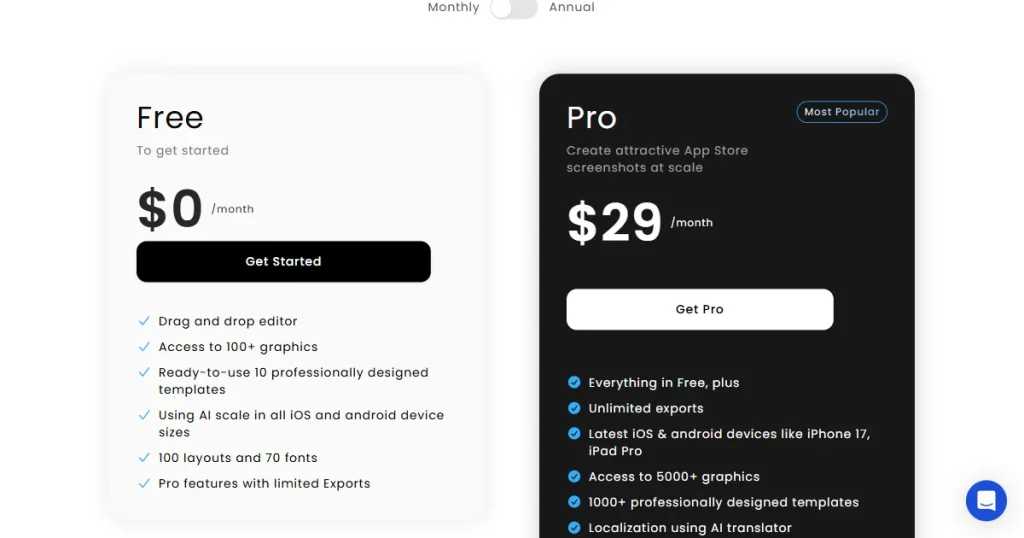
$19/month with code APPLOVE at checkout
2. Appshots
Appshots is a dedicated UI/UX research tool for product managers, designers, and founders to study app designs. It provides a curated gallery of high-resolution mobile app screenshots and onboarding flows from various categories.
What it does
Covers both apps and websites: This Mobbin alternative not only covers app UI screens but also covers website inspiration from some of the best-performing websites on the internet.
Complete user onboarding flow: Beyond app UI screenshots, this Mobbin alternative also showcases complete onboarding flows to inspire your designs.
Massive app UI screenshot library: Appshots also has one of the largest libraries of app UI screenshots, covering more than 600+ apps and 110k+ screens.
Updates regularly with new apps and UI/UX flows: Appshots also regularly updates its library with new apps and UI/UX use flows, so you always get fresh ideas before your competitors.
Pros
Offers a vast, organized library of real product screenshots for competitor analysis and emerging design patterns.
You can easily filter user flows by categories.
Best for the design teams as it offers a team plan.
Cons
Severely limiting the free plan, you get only four screenshots of the user onboarding, giving you minimal details.
No native editor, you have to use Figma or another design tool to recreate the same.
Pricing
$16/month
3. Pttrns
Next in our list of Mobbin alternatives is Pttrns, a design curation platform that offers inspiration and resources for mobile UI/UX design, featuring thousands of curated interface patterns, live app databases, and design guides for app developers and designers.
What it does
Curated library: Pttrns is a premium tool that only curates the best app UI flows and onboarding scenes of the best-performing apps.
Massive app database: This Mobbin alternative also offers a massive database of apps, so you can study how top apps structure their interfaces and apply the same principles to your app.
Build mood boards: Another major advantage of using Pttrns is that you can save all your inspiration in your library by creating mood boards and organizing your UX research.
Figma integration available: Pttrns also provides a Figma plugin so you can edit saved design inspirations directly in your Figma dashboard.
Community studio: This Mobbin alternative offers a space where you can connect with other designers, ask them questions, and learn about their design strategy.
Pros
Offers curated inspirations with clear categorization.
Features real app UI screenshots of only the best-performing apps.
Community studio helps designers receive and give feedback to improve their app designs.
Cons
No free plan.
Provides only static screenshots, no animated UI/UX design inspirations.
Pricing
$12/month
4. Collect UI
CollectUI is a dedicated daily inspiration platform for UI designers, aggregating curated elements like checkout flows, sign-ups, and pricing pages sourced primarily from Dribbble. It’s great for inspiration, but it doesn’t provide code, templates, or community support.
What it does
Completely free to use: CollectUI is a completely free platform for designers, where you don’t need to pay any amount for subscriptions
Daily updates: The best part of this free Mobbin alternative is that you get new UI/UX inspirations every day.
Element-level search: Instead of complete web pages or apps, you can filter and search interface elements like drop-downs, hero sections, and pricing sections.
Connect with real designers: Since it pulls from Dribbble, each element is traceable, so you can find who designed it, connect with them, and learn how they did.
Pros
Completely free to use.
Covers multiple design elements like user onboarding flows, drop-down elements, hero sections, and checkout pages.
Each element is properly tagged, so you can easily find any specific UI elements you’re looking for.
Cons
Only inspirations, no downloadable assets.
Read-only experience, you cannot save, curate, or create mood boards.
Doesn’t provide a community feature to connect with real designers to understand their designs.
Pricing
Free
5. Refero
Refero is a curated UI/UX design research library that helps designers and AI agents study top-performing web and mobile app interfaces, streamlining the design and benchmarking process.
What it does
Massive library: This Mobbin alternatives covers more than 135k real product screens, and 10k+ user flows, so you only find the best UI/UX design on the internet.
AI integration: Another major advantage that sets this Mobbin alternative apart from others is that it provides AI search features that let you find inspiration without manually searching.
Covers both iOS and web apps: Unlike other Mobbin alternatives, Refero covers both iOS and web apps, so you get a broader range of UI elements to explore.
Provides design.md files: It also offers design.md files make it easier for developers and designers to recreate different UI elements using AI tools like Claude Code.
Pros
AI-assisted research eliminates manual guesswork.
Clean UI and easy navigation.
Has a Figma plugin you can use to create product pages fast.
Cons
Focused on static screens rather than animated user flows.
Irregular updates, so it doesn’t cover trending apps.
Pricing
$17/month
Which Mobbin Alternative Is Best for Your Startup?
Let’s look at the best Mobbin alternatives for your startup based on your needs.
Best for App Screenshot Creation
When it comes to App screenshots, there can be no better Mobbin alternative than AppLaunchpad, which offers more than 4,000 app store screenshots from top apps on the market.
Moreover, you can copy the inspiration screens and edit them directly within AppLaunchpad’s app screenshot editor tool.
Best for UI Research
If you are looking for Mobbin alternatives dedicated to UI research, you can use Refero, which provides a massive library of UX patterns with over 135,000 product screens, AI-powered research capabilities to understand why a user flow works, and coverage of every nook and cranny of app UI design.
Best for Product Design Teams
For product teams looking for inspiration for their products, Appshots is the best Mobbin alternative, offering access to over 110K screens, complete onboarding flows, and team collaboration features that make competitor research easier for growing design teams.
Best for Budget-Conscious Startups
When it comes to indie developers with limited budgets, they can use Collect UI, a free Mobbin alternative that offers daily UI inspiration across multiple design elements without a subscription.
Final Verdict
Each Mobbin alternative we discussed in this list covers a different use case, so no matter if you are looking for a free Mobbin alternative or the best tool for UI research or app store screenshots, you’ll find them all.
However, if you are looking for app store screenshots inspirations, then you can use AppLaunchpad as its inspiration gallery is completely free to use, covers more than 4000+ app screenshots across 25+ categories. However, if you are a pro use you can copy the templates directly to your editor and create professional app screenshots by editing the elements.
FAQs
What is the use of Mobbin?
Mobbin helps designers and product teams study real app interfaces, user flows, and proven UI patterns for better product design.
Can I use Mobbin for free?
Yes, Mobbin offers a free tier with limited access, but most advanced features and premium design libraries require a paid subscription.
What is the best free Mobbin alternative?
AppLaunchpad is the best free Mobbin alternative for app store screenshots, and CollectUI is the best free Mobbin alternative for all UI elements.
Where can developers find free Mobbin app screenshots for research?
Developers can find free app screenshots on AppLaunchpad, as accessing its app store screenshot gallery doesn’t require you to log in to the tool.
What are the best Mobbin alternatives design inspiration websites in 2026?
The best Mobbin alternatives in 2026 include AppLaunchpad, Refero, Appshots, Pttrns, and Collect UI.
Boost app growth with the 20 best AI marketing tools of 2026. Master ASO, automate retention, and scale faster with expert picks for indie devs and growth teams