Top AppLaunchpad alternatives include Canva, Figma, Adobe Photoshop, and Device Art Generator, each offering different features, workflows, and levels of customization for creating app store screenshots.
However, each tool has its own share of pros and cons, that’s why in this blog, we’ll compare 8 AppLaunchpad alternatives, break down their pros and cons, discuss AppLaunchpad pricing, and help you decide if AppLaunchpad is still the best choice for your app store screenshot needs.
Key Insights
App store screenshots play a major role in improving app conversion rates and app installs.
Most AppLaunchpad alternatives focus on only one part of the screenshot creation workflow, rather than offering a complete solution.
Design tools like Photoshop and Figma offer flexibility but require more time, effort, and design skills.
Fast screenshot iteration is important for ASO testing because creative assets directly impact install conversion rates.
Many screenshot tools focus heavily on design flexibility but ignore ASO-specific needs like store compliance and resizing.
Store-compliant app screenshot templates help developers avoid screenshot rejection during the app review process.
App screenshot localization features help apps reach global audiences with region-specific screenshots. Screenshot generators with built-in localization can reduce operational workload for multilingual app launches.
Free screenshot generators are useful for beginners but often lack advanced customization and branding support.
Dedicated screenshot generators like AppLaunchpad simplify the entire app store screenshot creation process.
What is an App Store Screenshot Generator?
Before we talk about AppLaunchpad or any AppLaunchpad alternatives, it is crucial to understand what an app store screenshot generator is. App store screenshots are visuals developers use to showcase an app’s UI and functionality in the app store.
An app store screenshot generator is any tool that helps create app store screenshots. Some tools are dedicated app store screenshot generators designed for that purpose, while others offer screenshot creation alongside a bunch of other features like icon generator, localization of app’s visual assets, app inspirations, device mockups, and more. And AppLaunchpad offers them all.
What Features to Look for in an App Store Screenshot Generator?
Here is a list of features to look for in an app store screenshot generator that will help your app standout in the crowded app store marketplace.
Ease of use: A good app store screenshot generator should be easy to use, requiring no advanced design skills, so anyone can create professional-looking screenshots in minutes.
Meets app store screenshot guidelines: Apple’s App Store and Google Play Store have very strict and specific guidelines about the size of the app store screenshots, and if you don’t meet them, your app gets rejected during the review process. So, a good app store screenshot generator should always follow the app store’s guidelines.
Latest device coverage: Device mockups in an app store screenshot generator should always support the latest devices so the screenshots feel trendy, polished, and aligned with what users actually see in their hands.
Localization support: A good app store screenshot generator should always support localization features to help you create region-specific screenshots that feel native to every audience you target. This is important because localized screenshots can improve user trust, engagement, and app conversion rates in different markets.
Advanced resizing options: Creating screenshots for iPhones, Android phones, and iPads separately takes a lot of time, and a good app screenshot generator should automate resizing across every screen size in one click.
Brand assets: Manually adding your brand assets for each screenshot you create for your app takes a lot of time and effort. So, a good screenshot generator should allow you to upload your brand assets once and use them across multiple projects.
What is AppLaunchpad?
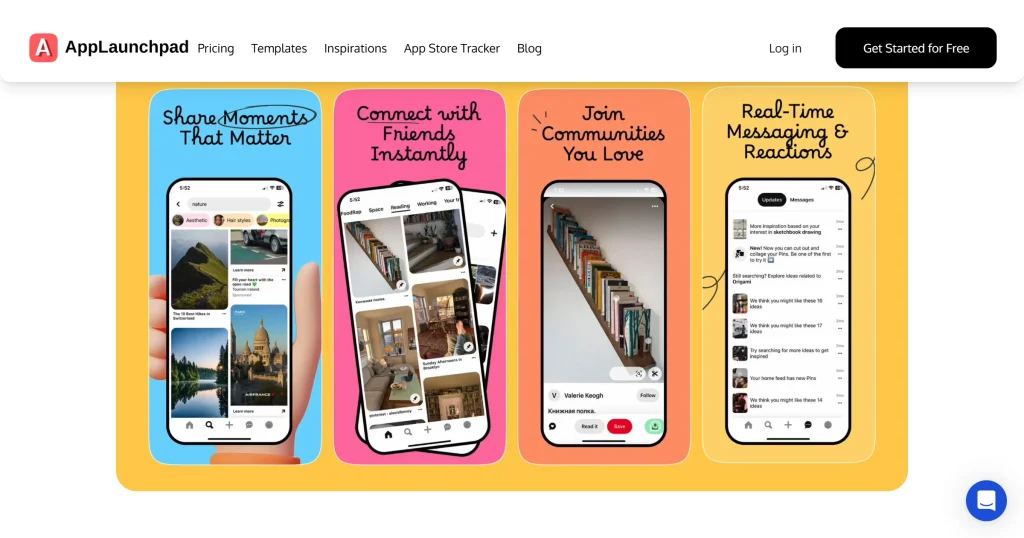
AppLaunchpad is a dedicated browser-based app screenshot generator that lets developers and marketers create professional-looking, high-converting app visuals for the Apple App Store and Google Play Store without design experience.
It is designed solely to bridge the gap between professional designers and beginners and serves as an alternative to complex software like Photoshop and Figma.
AppLaunchpad pricing currently starts at $29/month for the Pro plan, giving you access to premium templates, advanced editing tools, localization support, brand asset management, and one-click resizing for multiple devices. You can also get it for $19/month using the code APPLOVE.
Compared to basic screenshot generators, AppLaunchpad focuses more on scalability and workflow efficiency for teams managing screenshots across devices, locales, and app stores.
Top Features Supported by AppLaunchpad
Dedicated screenshot generator: Most AppLaunchpad alternatives include screenshot tools as part of a larger feature set, while AppLaunchpad is built specifically for creating app store screenshots.
Latest device coverage: AppLaunchpad supports all the latest iPhones, Android devices, and iPad sizes in its templates, like the iPhone 17 Pro Max and Samsung S21 Black.
Covers multiple frame types: Unlike most AppLaunchpad alternatives, AppLaunchpad supports a range of frame types, including 3D, clay, minimalist, and realistic.
Store-compliant screenshot templates: AppLaunchpad offers 1000+ prebuilt templates that meet the app store’s size and layout guidelines.
One-click localization: Many app store screenshot generators have limited language support, while AppLaunchpad supports more than 80 languages.
High-quality downloads: AppLaunchpad screenshot generator offers you a bunch of free templates to choose from, download them in the highest quality, and add them to your store listing.
Cloning features: AppLaunchpad lets you resize your screenshots for multiple devices with a single click.
Automatically saves projects: You won’t lose any of your screenshots as AppLaunchpad automatically saves all your projects.
Brand asset support: You can add your branding assets, like logos, and use them across multiple projects without having to add them ever again.
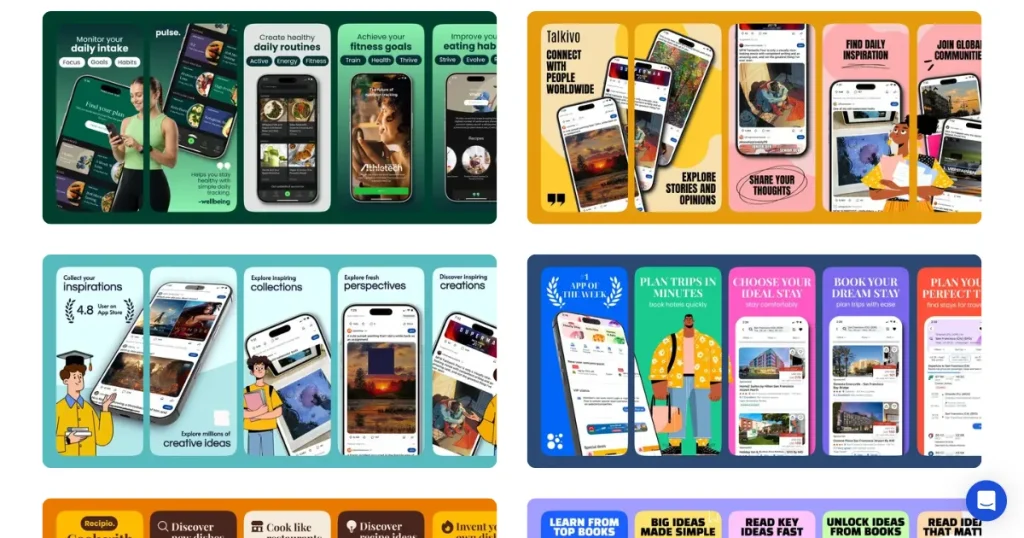
Screenshot inspiration gallery: To help beginners, AppLaunchpad also offers an app store screenshot inspiration gallery where you can browse 4,000+ b and copy them instantly to make your app stand out.
Top AppLaunchpad Alternatives at a Glance
Tool Name
Best For
Pricing
Key Advantage
Learning Curve
Canva
Beginners & quick designs
$18/month
Massive template library
Very Easy
Placeit
Professional mockups
$14.95/month
Multiple device frames
Easy
Hotpot AI
AI-powered designs
$10/month
Quick screenshot creation
Easy
Photoshop
Advanced editing
$22.99/month
Industry standard, full control
Steep
Figma
Team collaboration
$15/month
Real-time collaboration, plugins
Moderate
Device Art Generator
Quick mockups
Free
Lightweight, no sign-up
Very Easy
Appstore Screenshot
Quick app store screenshot creation
Free
Focused feature set
Easy
MockUPhone
Device mockups
Free
No sign-up, free mockup creation
Easy
The 8 Best AppLaunchpad Alternatives You Can Try
1. Canva
Best for all-in-one designs, but not a dedicated app store screenshot generator.
About the tool
Canva is a popular, user-friendly online graphic design platform that allows users to create professional-looking visuals, social media graphics, presentations, posters, and videos, even without advanced design skills.
Pros
Easy to use: Canva offers a drag-and-drop editor that lets you create designs quickly by dropping images, elements, or text into your project.
Massive library of templates: This AppLaunchpad alternative offers a wide range of device mockup templates, but most are locked behind a paywall.
Cost-effective: Priced at $18 a month, Canva allows you to use all of its premium templates, create multiple projects, and use its AI features.
Cons
Not a dedicated app store screenshot generator: Canva is not a dedicated app store screenshot generator, so you will have to manually handle sizing, spacing, and layouts.
Time-consuming: Unlike using pre-built app screenshot templates, this AppLaunchpad alternative will take up your time, as you need to design each screen manually and combine them into one smooth flow.
Most templates are hidden behind a paywall: Most of the good-looking templates in Canva are behind a paywall, making it difficult to create professional app screenshots on the free plan.
Pricing
$18/month
2. Placeit
Best for device mockups only, not for complete app store screenshots
About the tool
Placeit by Envato is an all-in-one, cloud-based design tool that lets users create professional mockups, logos, videos, and marketing materials directly in their browser.
Pros
Largest library of device mockups: This AppLaunchpad alternative offers one of the largest libraries of device mockups, covering multiple device frames and lifestyle and scene-based scenarios.
Easy to use:Placeit also includes a simple drag-and-drop editor that lets you create professional-looking device mockups with your screen UI in just a few minutes.
A good amount of free templates: Unlike most of the AppLaunchpad alternatives, Placeit offers a large amount of free templates that you can download in the highest quality and use for business purposes.
Cons
Doesn’t cover app store screenshots: With Placeit, you can only create device mockups, not complete app store screenshots. You will need to use another external tool, which will cost more time, effort, and money.
No repositioning: Another limitation of Placeit is that it doesn’t allow you to move your designs outside the mockup’s placement zone.
Generic templates: Even though this AppLaunchpad alternative offers a large number of mockup templates, most look generic.
Pricing
$14.95/month
3. Hotpot AI
Best for basic app store screenshot creation
About this tool
Hotpot AI is an AI tool that helps users create, edit, and improve images, graphics, and written content through a simple and easy-to-use interface.
Pros
Web-based tool: Since this AppLaunchpad alternative is a complete web-based tool, there is no need to download additional software.
Multiple use cases: Hotpot AI is not a dedicated app-store screenshot generator, it offers many other features, such as AI photo editing, AI headshot creation, and AI writing.
Wide variety of templates: Hotpot AI offers a wide range of app store screenshot templates across multiple niches, all editable to your needs.
Cons
Doesn’t cover the latest devices: Hotpot AI doesn’t support the latest devices, with its most recent model being the iPhone 12 Pro Max.
No localization or cloning support: With Hotpot AI, you will have to manually localize your screenshots for different regions and create different screenshots for different devices, which will take a lot of time.
Complex credit-based pricing system: Instead of following a monthly subscription-based pricing system, Hotpot AI offers a credit-based pricing system with no specific guidelines about which features cost how many credits.
Pricing
$10/month for 1000 credits/month
4. Photoshop
Best for graphic designers looking for complete creative control over their app store screenshots
About the tool
Adobe Photoshop is the industry-standard image editing software, offering unmatched professional-grade tools like advanced layers, masking, neural filters, and AI-powered Generative Fill for complete creative control.
Pros
Unlimited creative freedom: With Photoshop, you can create unique-looking app screenshots that make your app look professional and stand out from competitors.
Advanced editing options: This AppLaunchpad alternative offers advanced customization, including the ability to add shadows, 3D elements, badges, gradients, and fully personalized layouts to your screenshots.
AI tools support: Adobe Photoshop is constantly adding new AI features to its software to make it a bit easier to create an app store screenshot, even for beginners, if used properly.
Cons
Steep learning curve: Even with a bunch of AI features, Adobe Photoshop is not beginner-friendly and has a high learning curve.
High-end software requirements: This AppLaunchpad alternative is not a simple web-based solution. It requires a high-end laptop or PC to run smoothly.
Complex workflow: Photoshop has an extremely complex workflow, requiring multiple steps for even simple tasks, which can take a long time for even software experts.
Pricing
$22.99/month
5. Figma
Best for UX/UI designers to keep their UI designs and screenshots under the same software
About the tool
Figma is a browser-based UI/UX design tool known for its real-time collaboration, auto-layout, and prototyping features. While it is not built specifically for app store screenshots, many designers use it for that purpose through community-made templates and plugins.
Pros
App UI and screenshot designs in the same place: You don’t need to export your UI designs into another tool just to create app store screenshots. Everything can be designed and polished in one place.
Browser-based tool: Figma is a browser-based tool, so you don’t need to download any additional software to create your designs.
Visual consistency: This AppLaunchpad alternative helps maintain consistent fonts, colors, spacing, and layouts across all your app store screenshots using shared components and styles.
Cons
Steep learning curve: Similar to Photoshop, Figma also has a steep learning curve, making it not a good option for beginners.
Inconsistent template quality: Because template quality depends on the community submission, it varies significantly from one screenshot to another, making it difficult to maintain a consistent visual hierarchy.
Manual localization: When using this AppLaunchpad alternative, you will need to manually handle localization for each language, which is time-consuming.
Pricing
$15/month
6. Device Art Generator
Best for developers looking for simple Google Play Screenshots
About the tool
The Device Art Generator from Google is a web-based tool that quickly wraps app screenshots in realistic device mockups to display your app visuals professionally.
Pros
Easy to use: Since the tool is designed specifically for developers, it’s straightforward and doesn’t require installing any complex software.
Saves time: With this AppLaunchpad alternative, you can go from raw screenshots to ready-to-upload device mockups in just minutes.
Advanced customization options: It allows you to add shadows and glare to your device mockups to make them look more realistic and professional.
Cons
Not an app screenshot generator: Device art generator is only suitable for creating device mockups, not a dedicated app screenshot generator.
Limited customization: You can’t add text or change the background color of the mockups to makethemt look good.
Limited device frame selection: It doesn’t cover the latest iPhones or Android phones like the iPhone 17 Pro Max and Samsung S26 Ultra in its template library, making it unsuitable for creating modern-looking app store screenshots.
Pricing
Free
7. Appstorescreenshot.com
Best for quick basic app store screenshots
About the tool
Appstorescreenshot.com is a free, browser-based tool for generating app store screenshots, featuring device simulation and customizable templates.
Pros
Free and easy to use: It is a completely free tool with a drag-and-drop editor that lets you place your app’s UI directly inside device mockups.
Support live previews: This AppLaunchpad alternative lets you visualize changes to your screenshots in real time.
Web-based tool: Since the tool is completely browser-based, you don’t need to download any additional software to create and edit your app store screenshots.
Cons
Limited editing capabilities: With this AppLaunchpad alternative, you can only edit your screenshot text and change background colors, but you cannot add additional elements to your screenshots or rearrange device layouts as needed.
No localization: The tool doesn’t allow you to translate the text in screenshots from English to any other language, limiting the number of customers your app could reach.
Generic templates: All the templates featured in this tool look generic, with no unique visual identity to help your app stand out in a crowded app store.
Pricing
Free
8. MockUPhone
Best for quick device mockups
About the tool
MockUPhone is the most beginner-friendly device mockup tool out there. You don’t need to create an account or provide any personal details to use it, and you can download the device mockups in the highest possible quality, with multiple orientations, such as front and side views.
Pros
Completely free: MockUPhone is free with no account or sign-up required on your end.
High-quality exports: This AppLaunchpad alternative doesn’t limit your download quality, so you can export your mockups at the highest possible quality.
Commercial license included: Every device mockup you create with MockUPhone can be used for business purposes without any restrictions.
Cons
Not an app screenshot generator: With MockUPhone, you can create only device mockups, you would need a separate tool to create professional screenshots.
No advanced customization: With this AppLaunchpad alternative, you don’t get the option of changing its shadows, textures, or adding extra elements.
Nobrand kit or text support: The tool doesn’t allow you to add branding elements or text to the device mockups.
Pricing
Free
Which App Store Screenshot Generator is Best For You?
App store screenshots are the most crucial app visual asset that dictates if your app will be a hit or a miss, that’s why investing in the right tool yields massive results in the long term.
Each of the above AppLaunchpad alternatives offers something unique and useful, from free tools to those that help create device mockups quickly.
However, none of these AppLaunchpad alternatives is a complete solution for generating app store screenshots. AppLaunchpad still stands out with its easy-to-use editor, 1000+ store-compliant templates, one-click localization, advanced cloning features, and more.
How to Create App Store Screenshots using AppLaunchpad?
Now that we know why AppLaunchpad is the best app store screenshot generator, let’s look at the process of creating an app store screenshot using AppLaunchpad screenshot generator.
STEP 1: Create an Account and Login
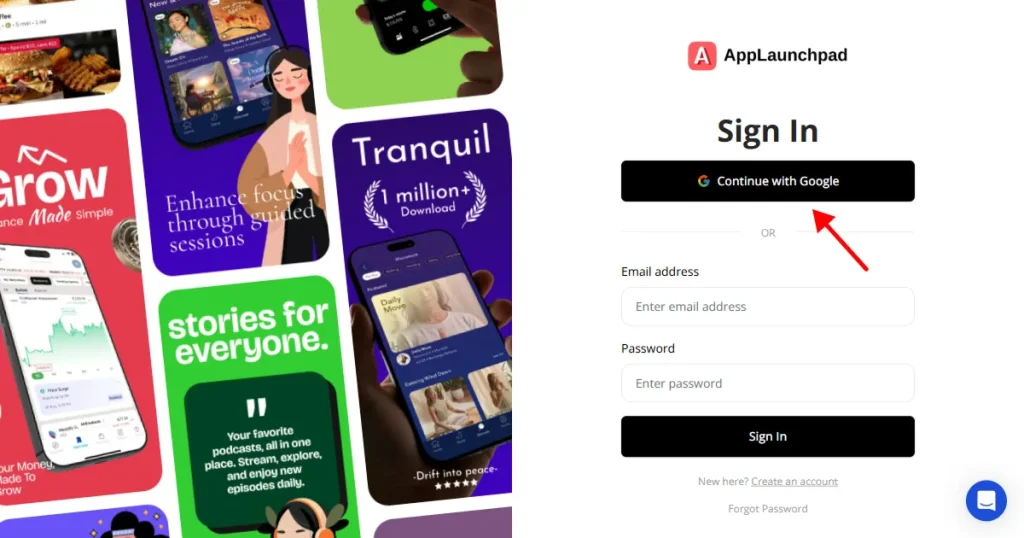
To create app store screenshots using AppLaunchpad, you need to create an account using your email address and password, or you can use the Google login method, which is preferred because it is fast.
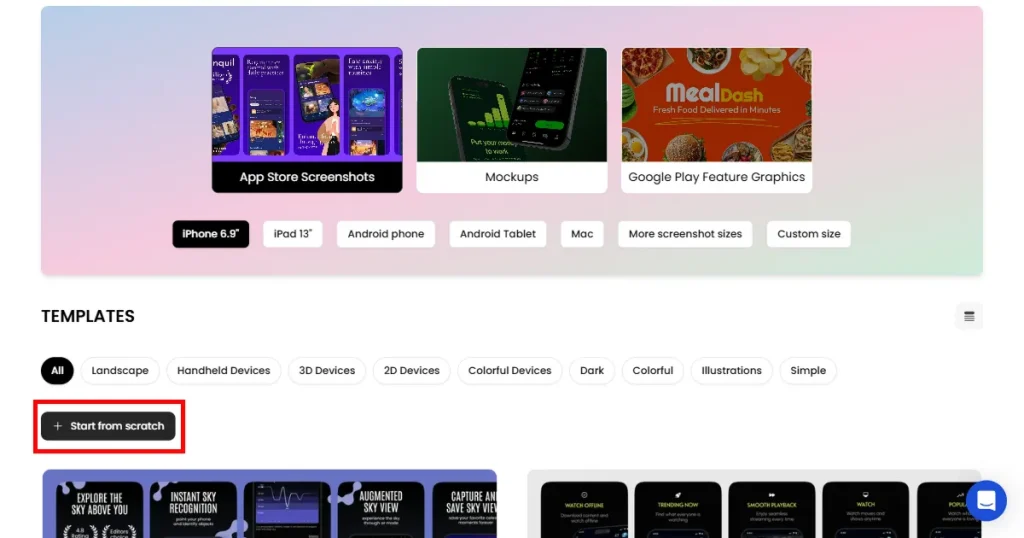
STEP 2: Choose How You Want to Start
With AppLaunchpad, you can choose whether you want to start from scratch or use a template. Most beginners prefer using a template to create screenshots as it is fast and easy to use.
STEP 3 Click on Template to Start Editing
If you choose to create from templates, you can click on any of the screenshot templates that align with the branding of your app to create a project and start editing it.
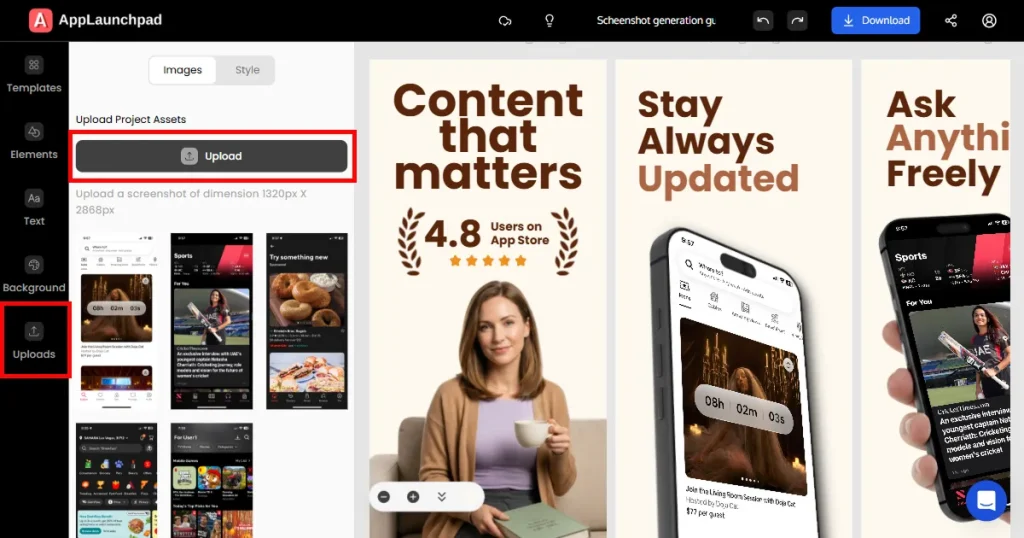
STEP 4: Upload Your App Screenshots
Next, you can add your app’s UI screenshots by clicking on the Upload button on the left-hand side. Then, click on the device mockups that you want to place your screenshot, and click on the uploaded files to place them one by one inside the template.
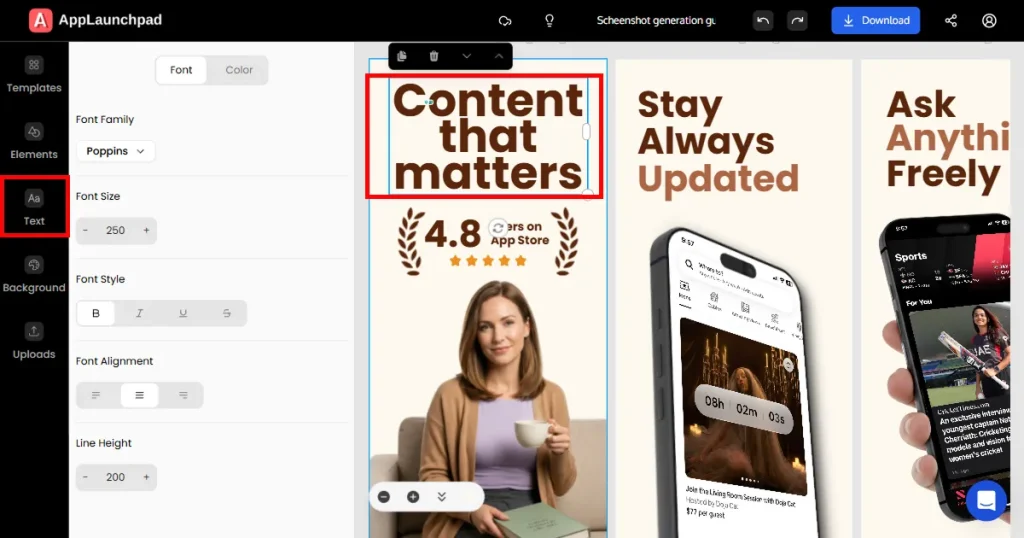
STEP 5: Edit the Text
Next, you can edit the text of the template by clicking on the text within the template, where you can customize its font, color, size, and alignment.
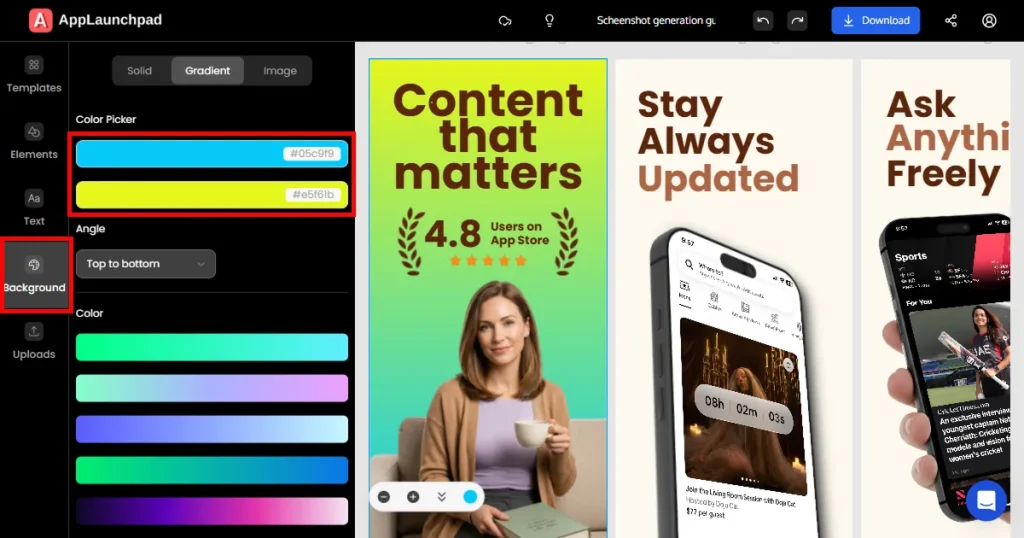
STEP 6: Change Screenshot Backgrounds
If you want, you can also change the background colors of the app store screenshots. You can click the Background button on the left-hand side of the screen to change the background color, choosing from solid colors, gradients, or images.
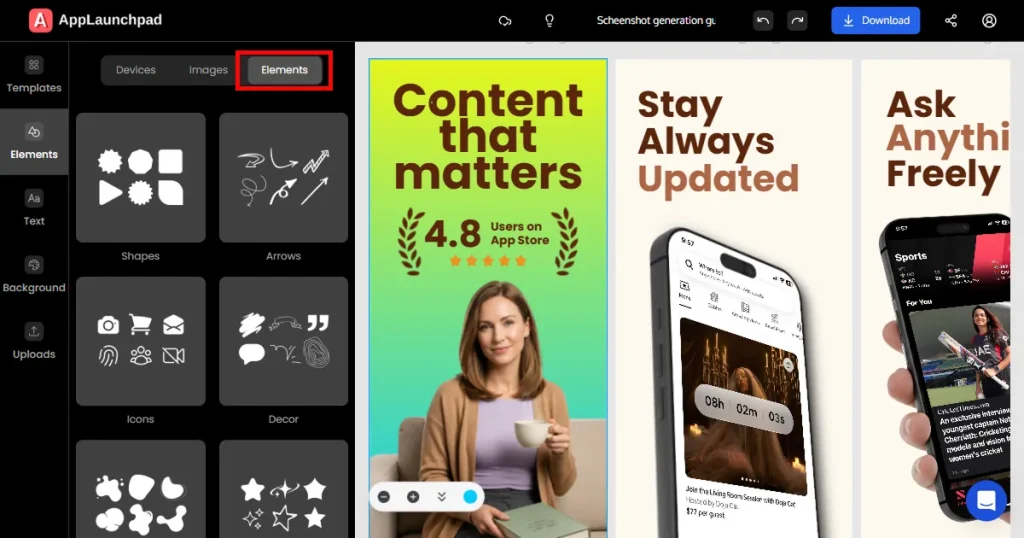
STEP 7: Add Different Design Elements
You can also add design elements to your screenshot to customize it further by clicking the Elements section on the left-hand side of the screen. Here you can choose different device frames, icons, illustrations, badges, and background patterns.
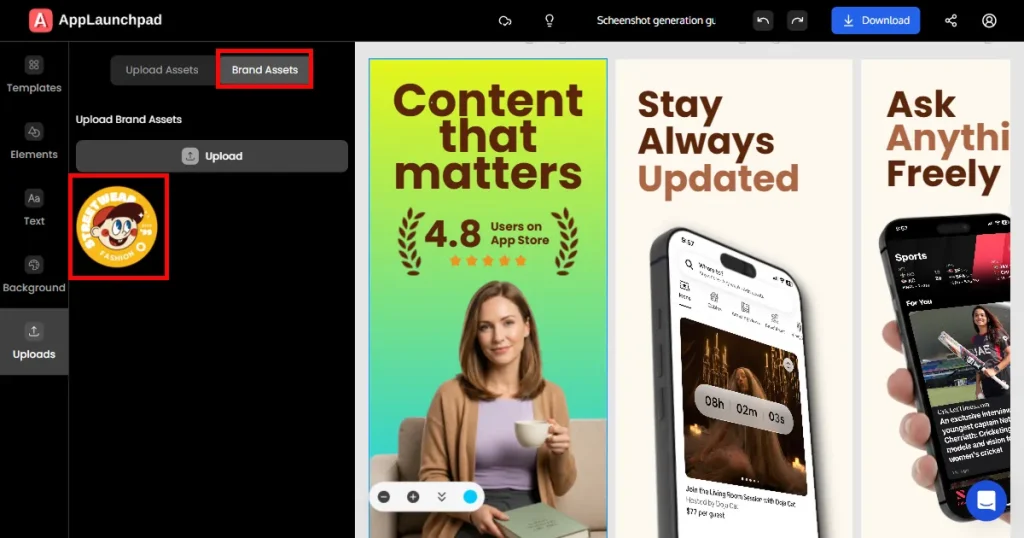
STEP 8: Add Your Brand Assets
You can also add your brand assets, like your logos, by clicking on the upload button on the left-hand side and choosing the brand assets section beside the Upload assets tab to reuse them later when creating different screenshots.
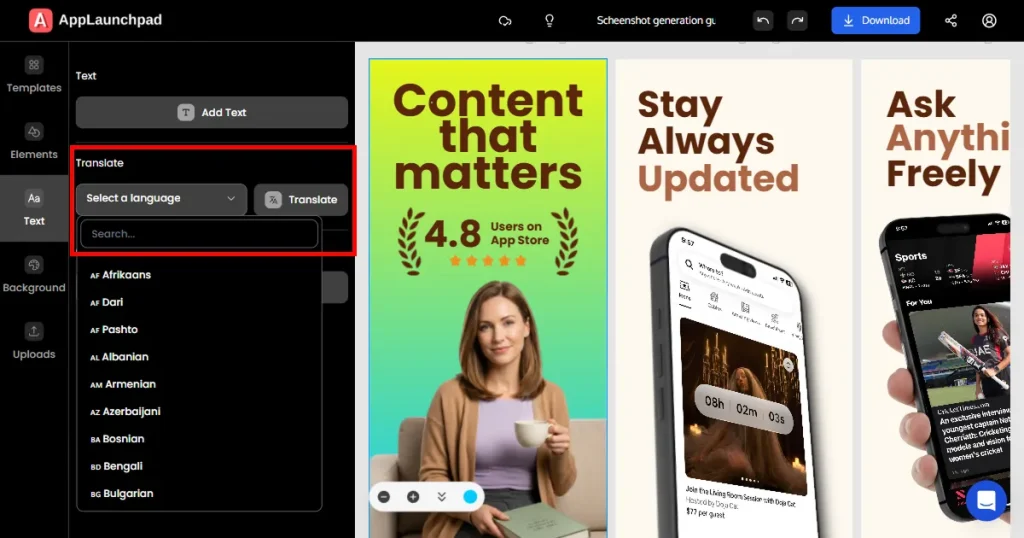
STEP 9: Use AI-Localization
You can also translate the text of your screenshot into multiple languages by clicking on the Text button on the left-hand side of the screen and choosing the language you want it to translate to.
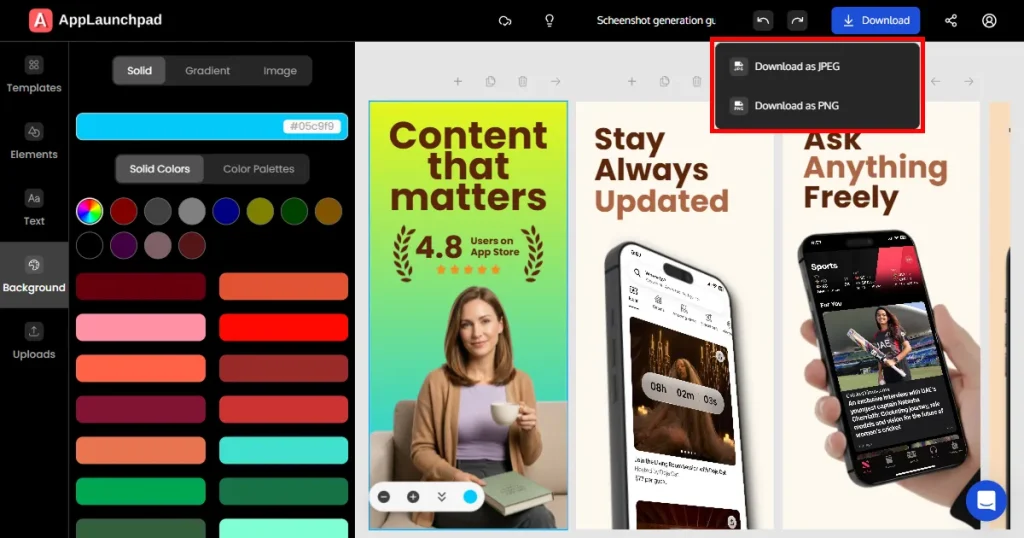
STEP 10: Export
Once you feel your screenshots are ready. You can click the Download button in the top-right corner of the screen to download them. You can download them in PNG or JPG. Once the file is downloaded, you can extract the ZIP file and add it to your app store listing.
Final Verdict
App store screenshots play a major role in converting app visits into installs, so choosing the right app store screenshot generator is crucial. While most AppLaunchpad alternatives like Canva, Photoshop, and Figma offer advanced flexibility, they are not dedicated screenshot generators.
That’s why AppLaunchpad remains the best app screenshot generator, offering an easy-to-use editor, 1000s of templates to choose from, advanced editing options, one-click localization, advanced resizing, and brand asset support.
FAQs
What is the free alternative to AppLaunchpad?
Device Art Generator by Google is a free AppLaunchpad alternative that allows you to place your screenshots in devices, but you will need a separate tool to edit them to look professional.
How to get app screenshots for the App Store?
To create app screenshots for the App Store use AppLaunchpad, with it you can create App Store screenshots pretty fast by choosing a template, adding your app UI screenshots, and editing them further.
What is the difference between AppScreenss and AppLaunchpad?
AppScreens focuses more on automation and localization, while AppLaunchpad is known for simpler drag-and-drop screenshot creation.
Is AppLaunchpad pricing worth it for indie developers?
Yes, AppLaunchpad pricing is worth it for indie developers who want faster App Store asset creation without hiring a designer.
Does AppLaunchpad screenshot generator support Google Play screenshots?
Yes, AppLaunchpad screenshot generator supports Google Play screenshots alongside Apple App Store formats.
Boost app growth with the 20 best AI marketing tools of 2026. Master ASO, automate retention, and scale faster with expert picks for indie devs and growth teams
Learn the Apple App Store ranking factors in 2026. Discover how keywords, installs, screenshots, ratings, and engagement influence your app’s search rankings.