The best App Store review management tools help developers and marketing teams respond to customer feedback, resolve issues faster, and improve user satisfaction by creating a better overall user experience.
Tools like AppFollow stand out for their advanced review automation and team collaboration features, while AppTweak is highly valued for combining review management with powerful App Store Optimization insights.
To shortlist these tools, we evaluated factors such as automation capabilities, review analytics, platform integrations, ease of use, and how effectively they help apps improve ratings and user retention over time.
In today’s blog, we will take a closer look at each platform and help you choose the right App Store review management tool for your app’s growth.
Key Insights
App Store review management tools help app teams manage customer feedback efficiently, improve app ratings, and strengthen long-term app growth across both the Apple App Store and the Google Play Store.
Strong app store review management is essential because app ratings and customer feedback directly influence user trust and app rankings.
Modern Apple App Store review management software allows teams to collect reviews from multiple app stores inside one centralized dashboard for faster management.
AI-powered review tools help automate responses, detect recurring complaints, and reduce hours spent manually handling customer feedback.
Faster review responses using app store review management tools enhance customer satisfaction and can lead users to revise their negative ratings.
Advanced Apple App Store review management software includes sentiment analysis, review tagging, workflow automation, and CRM integrations for better team collaboration.
Platforms like AppFollow, Appbot, and AppTweak combine review automation with analytics to help teams manage app reputation at scale.
The best App Store Review management tools combine automation, review monitoring, AI-powered replies, and performance tracking to help apps improve app ratings and increase downloads.
What Are App Store Review Management Tools?
App Store review management tools are software platforms that help developers monitor, manage, analyze, and respond to user reviews across app stores such as the Apple App Store and Google Play. Instead of manually checking reviews across different stores, these tools consolidate customer feedback into a single dashboard, making it easier to track ratings, respond to reviews, and identify common issues.
Many app store review management tools also include AI-powered features such as sentiment analysis, review categorization, automated responses, keyword tracking, and review translation. These features help developers understand user feedback at scale and prioritize bug fixes, feature requests, and customer support.
App Store review management tools are designed specifically for developers managing multiple apps across the Apple App Store and Google Play Store. These tools enable you to respond to user reviews promptly, solve their issues fast, and improve the rating of your app.
Why Do You Need App Store Review Management Tools in 2026?
Since managing app reviews is crucial to the success of your app, here are a few reasons why you need App Store review management tools.
App store reviews directly affect app rankings: Your app reviews are an important ranking signal for both users and app stores, helping them determine whether your app is high-quality. That’s why properly managing reviews can increase search rankings.
Manual review management becomes difficult at scale: Once your app grows and you start receiving 1000+ reviews a day, it becomes difficult to manage them manually. That’s why using App Store review management tools is a good idea.
Faster replies improve user trust: Faster replies show that you care about your user experience, and promptly fixing their issues might get them to reverse their negative ratings.
AI automation saves hours of repetitive work: Today, most App Store Review management tools provide AI-powered replies, automated workflows, and bulk actions to reduce manual effort.
Better ratings can increase app downloads: By managing your reviews effectively with App Store review management tools, you can improve your ratings and make new users more likely to download your app.
Best App Store Review Management Tools at a Glance
Before we dive deeper and discuss the best App Store review management tools in detail, let’s have a look at their pricing and what they are best for.
Tool Name
Best For
Standout Feature
Pricing
AppFollow
Teams managing high volumes of app reviews
AI reply assistant
$125/month
Appbot
AI-powered review analysis and automation
Sentiment analysis
$49/month
App Radar
Combining ASO with review management
AI review summaries
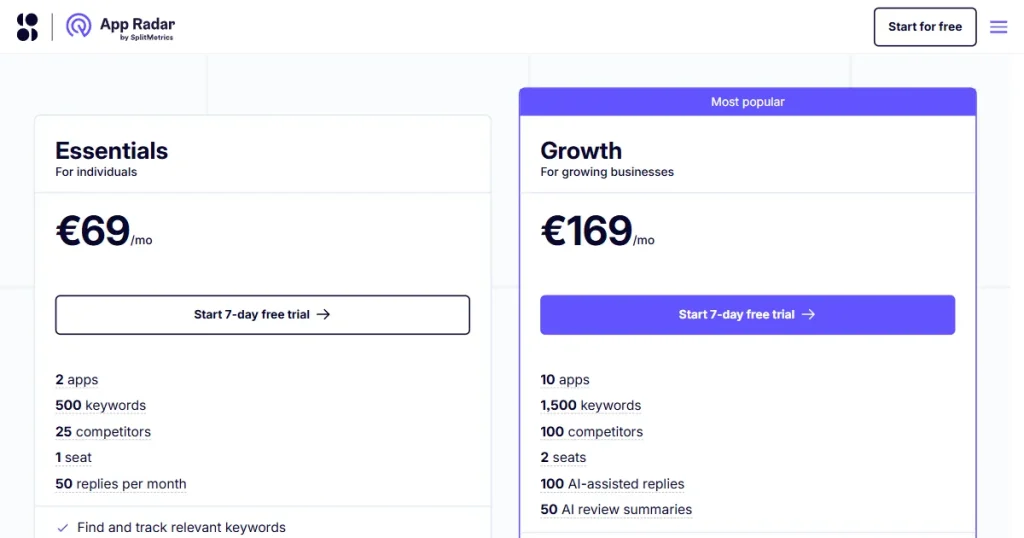
€69/month
AppTweak
Enterprise teams handling global app reviews
Bulk review replies
$99/month
ReviewFlowz
Small teams automating review monitoring
Slack review alerts
$45/month
ReviewTrackers
Tracking customer feedback and reputation
Reputation tracking
Custom pricing
How We Picked the Best App Review Management Tools?
To find the right App Store management tools for you, we tested them on the basis of these features.
Multi-store review management: We prioritized tools that collect reviews from both App Store Connect and Google Play Store in one dashboard, making review tracking much easier for growing app teams.
In-platform review replies: We evaluated whether the tool allows teams to respond to App Store and Google Play reviews directly from a single dashboard, without switching between developer consoles.
Smart automation and AI replies: We looked for platforms that use AI to generate personalized replies, automate repetitive review responses, and save customer support teams hours of manual work.
Sentiment analysis and feedback tracking: We evaluated whether the tool can automatically analyze customer sentiment, identify recurring complaints, and surface common bug reports or feature requests from user reviews.
Team collaboration and integrations: We selected tools that integrate with platforms like Slack, Zendesk, and Salesforce so product and support teams can manage reviews inside existing workflows.
Reporting, alerts, and performance insights: We assessed the quality of each tool’s reporting, alerts, and analytics to determine how effectively it helps teams monitor ratings, identify trends, and respond to emerging issues.
The 6 Best App Review Management Tools to Use in 2026
1. AppFollow
Best for: Teams managing high volumes of app reviews
Pricing: $125/month
AppFollow is an App Store review management tool that lets developers organize customer feedback, analyze sentiment analysis with AI, and respond to queries to resolve any issues users might be facing. This affects the app’s overall reputation and indirectly supports app growth.
Features
Smart review tagging: Groups bug reports, complaints, and feature requests automatically, making review management easier to manage.
AI reply assistant: Automatically generates timely, relevant responses to reviews with the power of AI.
Real-time review alerts: Receive notifications in real time for app rating or review updates.
Sentiment analysis: Monitors sentiment analysis to pinpoint areas of recurring feedback and gauge how happy users are.
Consolidated review dashboard: It analyzes reviews across multiple app stores and consolidates them into a single platform.
Pros
Useful tag to organize your bug reports, complaints, and feature requests.
For more review replies with AI assistant to generate faster review replies
Sends alerts when ratings or reviews change.
Analyzes sentiment analysis to spot feedback patterns.
Collects reviews from multiple app stores and presents them in the same workspace.
Cons
Expensive for smaller app developers.
The tool has a steep learning curve, and the dashboard needs time to get used to.
Better suited for scaling apps than for beginners.
2. Appbot
Best for: AI-powered review analysis and automation
Pricing: $49/month
Appbot is a dedicated Apple App Store review management tool that collects reviews from the App Store and Google Play, uses AI-powered sentiment analysis and text analysis to understand customer feedback, tracks rating changes over time, and allows teams to reply directly to reviews.
Features
AI Review replies: Generates automated AI-powered responses to App Store and Google Play reviews to save time.
Sentiment analysis: Analyzes customer feedback to understand whether reviews are positive, negative, or neutral.
Rating performance tracking: Monitors app ratings over time so you can track changes after updates or releases.
Keyword & feedback analysis: Identifies common words, complaints, and feature requests that users frequently mention in reviews.
Workflow integrations: Connects with tools like Slack, Zendesk, Microsoft Teams, Zapier, and Trello for smoother team collaboration.
Pros
One of the best tools for understanding sentiment analysis from thousands of app reviews.
Helps product teams quickly identify bug reports and feature requests users mention repeatedly.
Makes replying to customer reviews faster through workflow automation.
Works really well for teams managing reviews across multiple app stores.
Cons
Pricing can become expensive as your team size and number of apps increase.
The dashboard can feel a little overwhelming if you only need basic review management features.
3. App Radar
Best for: Combining ASO with review management
Pricing: €69/month
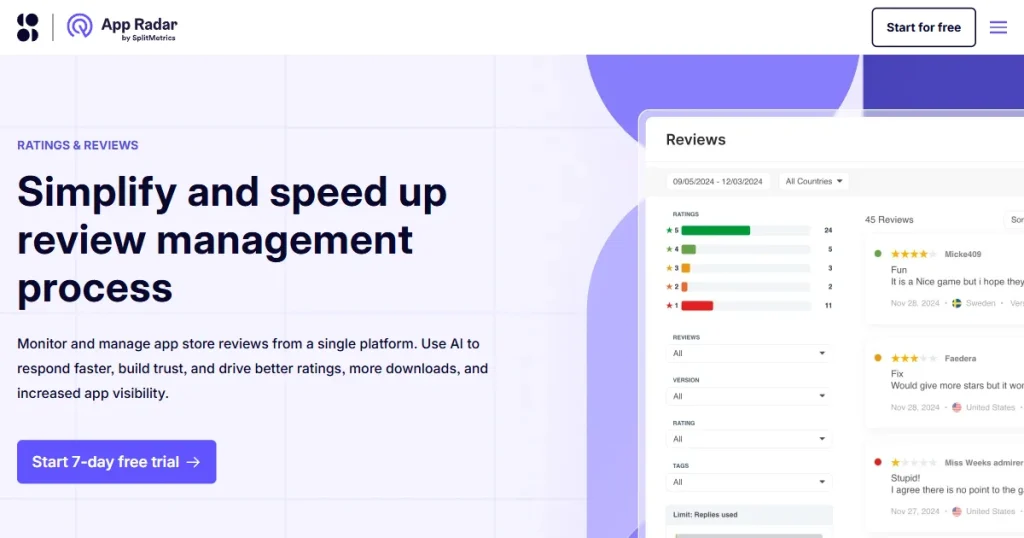
App Radar by Splitmetric Optimize is one of the best App Store optimization tools in the market, and as part of its complete ASO service, it includes an App Store review management tool that allows developers to track ratings, analyze review trends, and monitor competitor feedback to improve app performance faster.
Features
Unified review dashboard: Manage both App Store and Google Play reviews from one centralized dashboard.
AI review replies: Uses AI-generated replies to help teams respond to customer reviews much faster.
AI review summaries: Summarizes user feedback automatically so you can understand sentiment analysis at a glance.
Slack alerts & filters: Sends Slack notifications and let teams filter urgent reviews that need quick action.
Scheduled review reports: Generates scheduled reports to track review trends and monitor competitor updates.
Pros
Makes review management faster with AI replies.
Good for tracking rating trends by region.
Let’s teams monitor competitor feedback easily.
Supports review management and complete ASO in one tool.
Cons
Higher pricing compared to review-only tools.
Can feel complex because of too many ASO features.
4. App Tweak
Best for: Enterprise teams handling global app reviews
Pricing: $99/month
AppTweak is also one of the best App Store optimization tools out there, which also includes an App Store review management software that allows developers to manage App Store reviews at scale by centralizing reviews, generating AI-powered replies, automating bulk responses, and connecting review workflows with CRM tools like Slack, Zendesk, and Salesforce.
Features
Centralized review hub: Collects app reviews across multiple apps, countries, and languages in one dashboard.
GPT-4 AI replies: Uses GPT-4-powered responses to help teams reply to customer reviews faster.
Bulk review replies: Let’s teams respond to large volumes of app reviews at once with bulk reply options.
Instant review translation: Automatically translates reviews and replies instantly for easier global communication.
CRM integrations: Connects with tools like Slack, Zendesk, and Salesforce for smoother workflow management.
Pros
Great for managing large review volumes.
Bulk replies save customer support time.
Works well with existing CRM tools.
Cons
Pricing is high for smaller app teams.
Better for enterprise teams than indie developers.
Advanced features may take time to learn.
Too feature-heavy if you only need simple review tracking.
5. ReviewFlowz
Best for: Small teams automating review monitoring
Pricing: $45/month
ReviewFlowz is an Apple App Store review management software that helps app teams automatically track customer reviews, send Slack alerts, monitor rating changes, organize review workflows, and manage app store feedback without switching between multiple platforms.
Features
Automatic review collection: Collects App Store and Google Play reviews automatically in one place for easier management.
Slack review alerts: Sends instant review notifications directly to Slack so teams can respond faster.
Feedback Trend Tracking: Tracks customer feedback trends across multiple app listings to identify common patterns.
Custom review workflows: Allows teams to create workflows that streamline how incoming reviews are managed.
Competitor review monitoring: Helps monitor competitor reviews and rating changes to track market performance.
Pros
Good Slack integration for faster review monitoring.
Easy to set up for smaller app teams.
Helps automation review tracking workflows.
Cons
Fewer advanced AI features compared to bigger platforms.
Limited analytics compared to ASO-focused tools.
Better for review monitoring than full app growth management.
Smaller platform with fewer integrations.
6. Review Trackers
Best for: Tracking customer feedback and reputation
Pricing: Custom pricing
Review Trackers is also an Apple App Store review management software that helps businesses collect customer feedback reviews from multiple sources, understand sentiment analysis, monitor recurring complaints, and measure how brand reputation changes over time, to improve app ratings and rank higher in app rankings.
Features
Automatic review collection: Collects App Store and Google Play reviews automatically in one place for easier management.
Slack review alerts: Sends instant review notifications directly to Slack so teams can respond faster.
Feedback trend tracking: Tracks customer feedback trends across multiple app listings to identify common patterns.
Custom review workflows: Allows teams to create workflows that streamline how incoming reviews are managed.
Competitor review monitoring: Helps monitor competitor reviews and rating changes to track market performance.
Pros
Makes it easier to keep track of reviews across multiple channels.
Helpful for spotting customer issues before they become bigger problems.
Good reporting tools for tracking reputation trends.
Works well for teams handling large amounts of customer feedback.
Cons
Pricing is not transparent on the website.
Better suited for bigger teams than solo developers.
Some advanced features may feel unnecessary for smaller apps.
Common Mistakes Teams Make While Managing App Reviews
Here are a few common mistakes that developers make while managing app reviews.
Ignoring negative reviews for too long: Many developers delay responding to negative reviews, which can frustrate users and damage the overall app reputation over time.
Using generic replies for every review: Responses should feel genuine and authentic, not repetitive or copy-pasted, to build better customer trust.
Not tracking recurring user complaints: Teams often miss patterns in reviews, making it harder to identify bug reports, performance issues, or feature requests users repeatedly mention.
Managing reviews manually at scale: Switching between App Store Connect and Google Play Store manually wastes time, especially when apps start receiving large review volumes.
Treating reviews only as customer support tasks: App reviews often contain valuable product feedback, but many teams fail to use that data to improve user experience and future app updates.
How to Choose the Best App Store Review Management Tool for Your App?
Choosing the best Apple App Store review management software can be difficult when most of the tools offer similar features. That’s why keep these points in mind when choosing an App Store review management software.
Multi-Store Review Management: If your app has global users, select one that has multilingual support. Reviews from the Apple App Store and Google Play Store should be aggregated into your tool’s interface for easy management.
Sentiment analysis & Review Insights: Select tools that utilize AI to automatically cluster reviews by topics such as bug reports, feature requests, pricing-related matters, or usability difficulties.
AI-Powered Review Replies: The most complete suites should provide AI-powered responses, bulk-reply features, and customizable templates, helping you reply faster.
Workflow Integrations: Choose a tool that integrates with your favorite platforms, such as Slack, Zendesk, Salesforce, and Microsoft Teams, to simplify collaboration within your team.
Analytics and performance tracking: You should expect your review management tool to monitor review patterns, rating fluctuations, and how customer responses are affecting your overall app ratings.
The Bottom Line
As competition on the Apple App Store and Google Play continues to grow, responding quickly to customer feedback, solving issues, and maintaining strong app ratings directly impact your app’s visibility, user trust, and long-term growth.
This is exactly why investing in the right App Store review management tool has become increasingly important for app teams in 2026. Although we have discussed a few tools, the best App Store review management tool depends on your app size, budget, and how actively your team manages customer feedback at scale.
FAQs
What is the best review management software?
The best review management software is App Follow, as it provides a comprehensive review management system. However, before making a choice, please check whether it’s the right tool for your app’s size, budget, and how actively you respond to reviews.
What are management review tools?
Review management tools are part of App Store Optimization that help businesses monitor, organize, and respond to customer reviews across different platforms.
Why is app store review management important for growing mobile apps?
App Store review management plays a crucial role in maintaining an image of your app and a higher rating on the app stores. If your rating drops or your app receives a negative review, you can respond to it directly and maintain a positive image.
Which Apple App Store review management software is best for managing reviews at scale?
AppTweak and AppFollow are among the best Apple App Store review management software for handling large volumes of app reviews and making sense of them.
What are the best app store optimization tools for improving app visibility and ratings?
App Radar, AppTweak, and AppFollow are among the best App Store optimization tools that help improve app visibility and ratings.
How do Apple App Store Review Management Tools help improve customer feedback workflows?
Apple App Store review management tools help you improve user experience by notifying you when you receive a review, analyzing it to understand the sentiment analysis behind it, and generate AI replies to speed up the workflow.
Boost app growth with the 20 best AI marketing tools of 2026. Master ASO, automate retention, and scale faster with expert picks for indie devs and growth teams