20 Best AI App Marketing Tools In 2026
Boost app growth with the 20 best AI marketing tools of 2026. Master ASO, automate retention, and scale faster with expert picks for indie devs and growth teams
The ASO keywords list is a collection of keywords you can use in your app metadata, such as the app title, subtitle, description, and keyword field.
And optimizing this keyword list helps Apple understand what your app is about and rank it higher in search results. But the keyword list allows only 100 characters, making it difficult to decide which keywords to include and which keywords to avoid.
So, to help you understand how to optimize app store keywords and make the best use of the characters allowed, here are a few tips to improve ASO keywords list, and some of the best ASO keyword tools you can use.

ASO keyword list is a collection of keywords that you can add to your app store page to increase your app’s discoverability on the Apple App Store. Because this dedicated keyword field is a critical factor for Apple’s search algorithm, it significantly influences how easily users find your app.
However, it imposes a strict 100-character limit, which means every character is valuable and requires you to prioritize high-relevance terms strategically rather than simply listing as many keywords as possible.
That’s why it’s crucial to follow the right tips to improve ASO keywords and optimize your ASO keyword list for better rankings and visibility.

To better understand the best tips to improve ASO keywords for your app store page, let’s explore the different ASO keyword terminologies.
Let’s explore why ASO keyword research is the foundation of a successful App Store optimization strategy and how it helps improve your app’s visibility, attract the right users, and drive sustainable organic growth.

ASO keyword research helps you understand the exact terms users enter when searching for apps like yours. By optimizing your app’s metadata with relevant keywords, you increase the chances of appearing in more App Store search results, making your app easier for potential users to discover.

Not every app download is equally valuable. Keyword research helps you target search terms that match your app’s features and user intent, allowing you to attract users who are more likely to download, engage with, and retain your app over time.
By following the best tips to improve ASO keyword ranking, you increase the chances of your app being discovered organically, reducing the amount of money you would be spending on ads and user acquisition campaigns.
Keyword research also helps you uncover gaps in your competitors ASO strategies. By identifying relevant keywords with strong search demand but lower competition, you can target opportunities that improve your rankings and grow your app’s visibility before the market becomes more competitive.

Before exploring the best tips to improve ASO keywords for your App Store listing, it’s important to understand the key ASO keyword metrics you should track.
| Feature | iOS (Apple App Store) Keyword List | Google Play Store Keyword List |
| Dedicated Keyword Field | Yes (100-character keyword field) | No dedicated keyword field |
| Primary Keyword Sources | Keyword field, app title, subtitle | App title, short description, long description |
| Keyword Limit | 100 characters in the keyword field | No fixed keyword field limit |
| Comma-Separated Keywords | Yes | No |
| Keyword Updates | Requires submitting an app update | Can be updated through store listing changes |
| Search Algorithm | Relies heavily on metadata fields | Considers metadata, descriptions, user behavior, and engagement |
Here are the 8 tips to improve ASO keyword strategy and increase the chances of your app being discovered.
The very first tips to improve your ASO keyword strategy is to start from the perspective of a real customer. Think about what they might search for in the App Store or the exact terms they use to describe their pain point. You can easily understand their language by going through the reviews of your competitors, where your ideal customers might gather to share their opinions on the app.

Include a mix of generic and specific keywords in your keyword field and metadata, as this helps Apple properly index your app and understand its functionality. For example, if you’re launching a fitness app, you can include generic keywords such as fitness, gym, etc.
This would increase the number of users you can reach, but to improve your conversion rate, you also need to include specific keywords like free home workout app or calisthenics for beginners. This attracts dedicated users who are more likely to download your app.

To keep your app consistently in the search results, target keywords that users might use while searching for apps. For example, a person looking for a guitar lesson app might search for terms like learn guitar or guitar lessons.
Use ASO keyword tools to find relevant keywords and add them to your metadata and keyword fields to improve your app’s discoverability.

One of the best tips to improve ASO keyword ranking is to focus on trending keywords. For example, when the 75 Hard trend took off on the internet, many users searched for apps that could help them track their progress.
Fitness and habit-tracking apps that updated their metadata to include relevant keywords were better positioned to appear in those searches, attracting high-intent users looking for that specific functionality.
Since the keyword field on your App Store page isn’t visible to users, there’s no need to add spaces after commas. Apple automatically treats each comma-separated term as a separate keyword, so removing those spaces saves valuable characters and gives you room to include one or two additional keywords.
Also, remember to remove plural keywords for existing singular keywords, as Apple treats them the same. By doing so, you can save crucial keyword character space and add more relevant keywords to your keyword field.
Apple App Store algorithm is extremely intelligent, it automatically creates combinations of keywords from existing keywords in your keyword field and ranks your app for the same.
For example, instead of adding learn guitar as a single keyword, you can break that down to include learn and guitar as separate keywords. This removes duplication and gives you space to add more relevant keywords.
Apple automatically indexes keywords from your app name, subtitle, developer name, and app category. Repeating these terms in the keyword field doesn’t provide additional ranking benefits and only wastes valuable character space. Use that space to target new, relevant keywords that can help your app rank for a wider range of search queries.
One of the best tips to improve ASO keyword list is to look for relevant keywords using tools like Search Match and Keyword Recommendations from Apple’s ad tool library. This gives you a snapshot of the exact keywords Apple recommends for your ads, and you can also use them on your app store page.
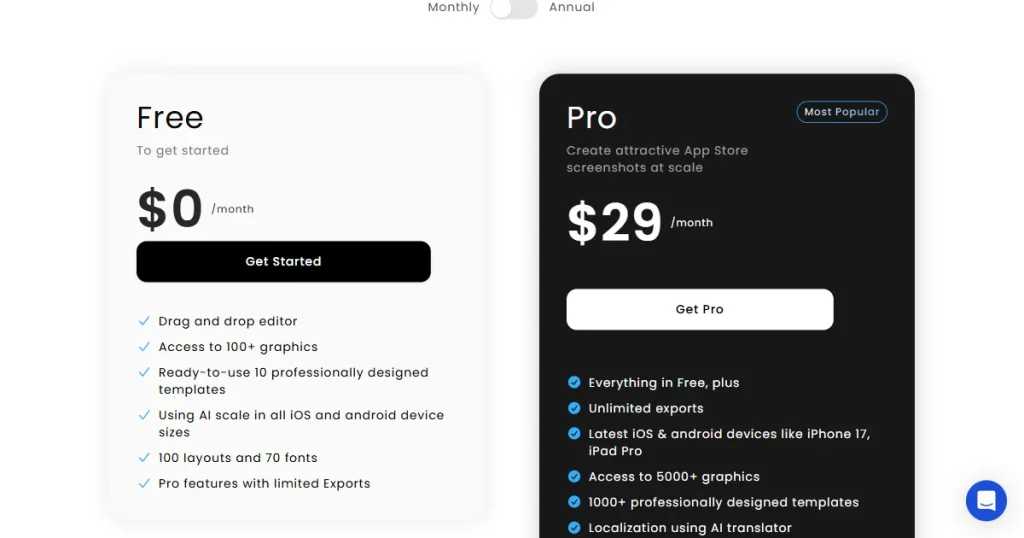
AppLaunchpad is a dedicated app store screenshot generator, but it also includes a powerful ASO keyword tool that allows users to find and target the right keywords to improve ASO keywords list and strategy.
Key features:
| Pros | Cons |
| Combines ASO keyword research, competitor analysis, and app screenshots in one platform. | The extensive feature set may feel overwhelming for first-time users. |
| AI-powered keyword insights help identify ranking opportunities faster. | Not exclusively focused on ASO keyword optimization. |
| Supports both Apple App Store and Google Play Store keyword research. |
Pricing:

ASOMobile is an app keyword research tool that helps developers find better keywords for their App Store listing. It lets you discover new keyword opportunities, monitor keyword rankings, analyze competitor keywords, and improve your app’s visibility with data-backed insights.
Key Features
| Pros | Cons |
| Supports both Apple App Store and Google Play keyword research. | Smaller keyword database than some competitors. |
| Offers free ASO tools to get started. | Advanced features require a paid plan. |
| Provides useful keyword metrics like search volume and difficulty. |
Pricing:


App Radar is one of the best ASO keyword research tools that helps developers improve their App Store and Google Play rankings. It makes it easier to find the right keywords, monitor rankings, track competitors, and discover new opportunities to increase organic app downloads.
Key Features
| Pros | Cons |
| Easy to use, even for beginners. | Pricing may be high for solo developers. |
| Makes keyword tracking and competitor research simple. | Some advanced features are available only on higher plans. |
| Helps uncover new keyword opportunities with AI suggestions. | Limited market insights compared to enterprise-focused tools. |
Pricing:

Implementing these tips to improve ASO keywords list helps you make the most of the app store keyword list features on the app store page and make sure your app ranks higher when users search for those keywords.
That’s why it is crucial to do proper app store keyword optimization using ASO keyword tools like AppLaunchpad to find the best keywords that you can include in your app metadata and improve your app ranking.
To find ASO keywords, you can use app store keyword research tools like AppLaunchpad, which helps to discover the right keywords that you can track and rank for.
To optimize iOS App Store keywords, follow the best tips to improve ASO keyword performance by targeting relevant, high-volume search terms, removing duplicate and unnecessary keywords, and regularly updating your keyword list based on trends and performance.
Some of the best app keyword research tools include AppLaunchpad, ASOMobile, and App Radar for keyword discovery, competitor research, and rank tracking.
App Store keyword research helps find high-volume, relevant search terms that increase your app’s chances of appearing in user searches.
AppLaunchpad is the best ASO keyword tool as it helps you discover relevant keywords and optimize your App Store metadata.
You should update your iOS App Store keyword list every 3 to 4 weeks to optimize for shifting trends. Because Apple’s algorithm takes roughly 2 to 4 weeks to index changes and stabilize rankings, updating too frequently resets your momentum.